Changelog
Microsoft SQL Server, locked data source schemas, and form grids
This release adds Microsoft SQL Server data sources, schema locking for data sources, and a grid layout for forms.
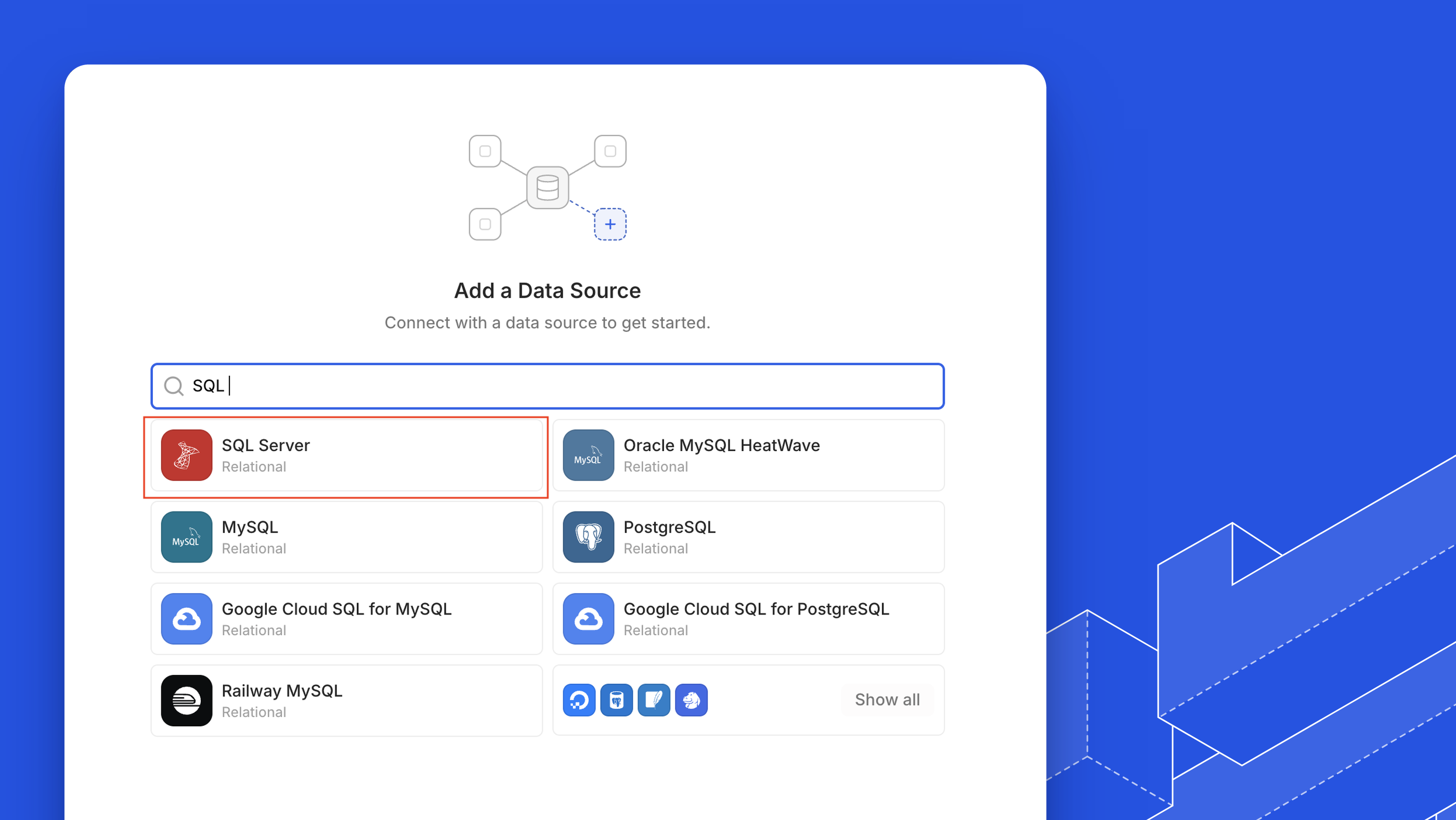
Connect Microsoft SQL Server databases
You can now connect Microsoft SQL Server 2017 and later as a data source, including managed services such as Azure SQL Database, with introspection, reads, writes, and schema changes. Connections use SQL Server password authentication and can encrypt and verify the server certificate. See SQL Server for connection options and limitations.
 Shipped byBram Geron
 Shipped byReza Baar
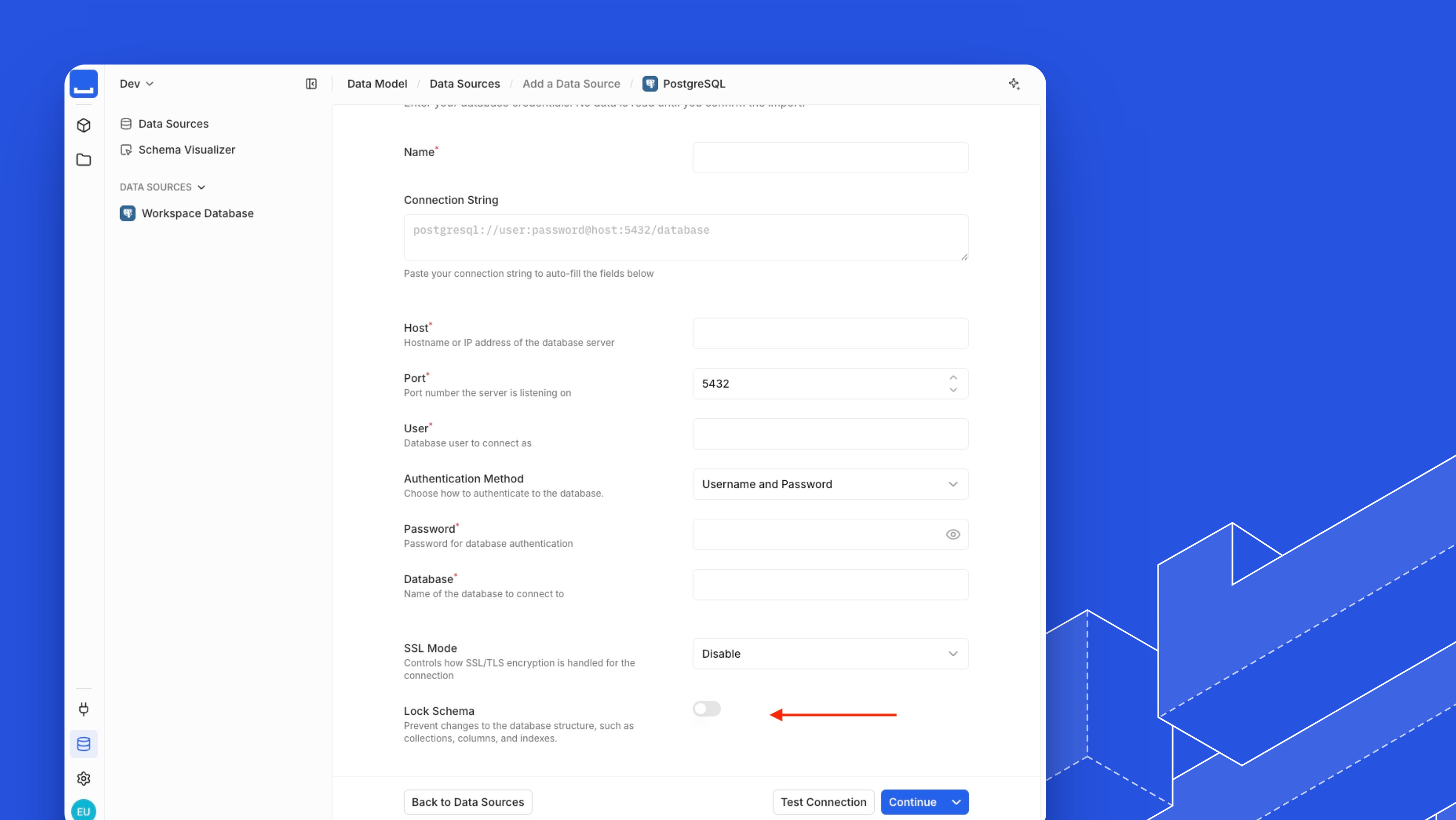
Lock a data source's schema
You can now lock a data source's schema so Monospace never changes its database structure, while API names and appearance settings stay editable. The engine enforces the lock for every user, including administrators, and a schema refresh still brings in changes made in the database. See Data Source Access.
 Shipped byPrzemyslaw Hugh KaznowskiShipped byReza Baar
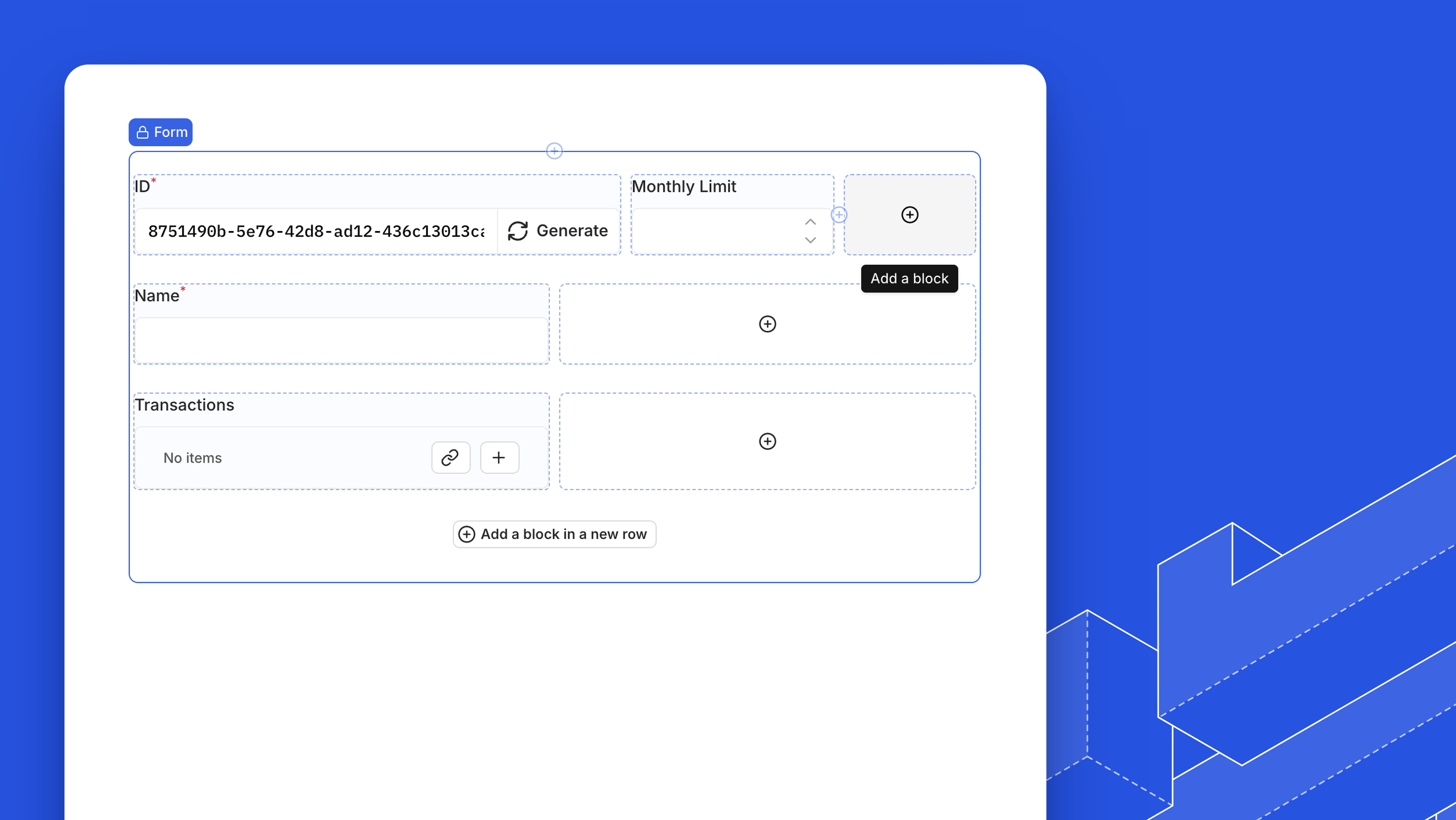
Arrange form fields in a grid
You can now lay out an ejected form's fields on a 12-column grid: place fields side by side and drag their edges to resize them. See Arrange Fields in a Grid.
 Shipped byGuillaume Chau
- The field template picker groups templates into Fields and Relational Fields.
- Breadcrumbs follow one pattern in every Studio area, with switchers for the space and its pages.
- Display templates that are cut off show their full content in a tooltip.
- The email you enter at sign-in carries over to the password reset form and back.
- A policy's collection permissions show a hint to create a collection when the workspace has none.
- Equality filters and single-item reads, updates, and deletes can use indexes on PostgreSQL data sources.
Esccancels a drag or resize in a grid layout.- In clustered mode, a release with a destructive migration doesn't start until you approve it, so replicas still on the previous release keep serving. See Upgrades and Rollbacks.
- Fixed outbound TLS connections accepting certificates issued by the compromised eMudhra/emSign certificate authorities.
- Fixed known vulnerabilities in dependencies, including denial-of-service issues in QUIC handling.
- Fixed adding or refreshing a data source failing when a related collection's database name contains characters API names don't allow, such as a space.
- Fixed file uploads being unavailable in fields related to system files.
- Fixed On Success actions not running on forms without a collection.
- Fixed new Select, Slug, and Repeater blocks being inserted with the wrong default settings.
- Fixed field path pickers expanding Studio-only relations, such as a file's preview, without end.
- Fixed blocks in a grid layout jumping columns when picked up, or being duplicated when dropped into a full row.
- Fixed blocks such as relation inputs failing to render while you drag them in the editor.
- Fixed the column resize indicator drifting from the column edge in drawers and overlays.
- Fixed Connect page tabs truncating their labels to a single letter.
- Fixed the template wizard cutting off its content on short screens.
Improvements and fixes
This release includes security fixes and Studio improvements.
- The policy editor disables actions a collection's data connector does not support, and granting all access grants only the supported actions.
- New User and File relation fields fill in their API name from the display name, as other fields do.
- Fixed nested writes and AI item tools reaching items in system collections.
- Fixed failed sign-ins and password reset requests revealing through their response time whether an account exists.
- Fixed saving block changes failing in the page and space builders.
- Fixed calendar event titles not rendering a relation field. They now show the related item through its collection's display template.
- Fixed labels and values being cut off in settings and data model forms on narrow screens.
- Fixed the field type picker cutting off type descriptions in the field drawer.
- Fixed some buttons and panels, including repeater items, running their action twice per click.
- Fixed raw translation keys appearing in place of text, such as the role placeholder when changing a member's organization role.
Data connector extensions
This release previews data connector extensions, which connect APIs and other systems to Monospace as data sources.
Connect other systems with data connector extensions
Data connector extensions are now in preview. You can use them to connect APIs and other systems as data sources. Each connector declares the operations every collection supports, and the API and Studio offer only those. A connector also declares the network hosts it needs. Studio shows them when you add the data source and asks you to approve any more the connector requires for your configuration. The connector runs in a sandbox that can reach only the hosts granted to that data source.
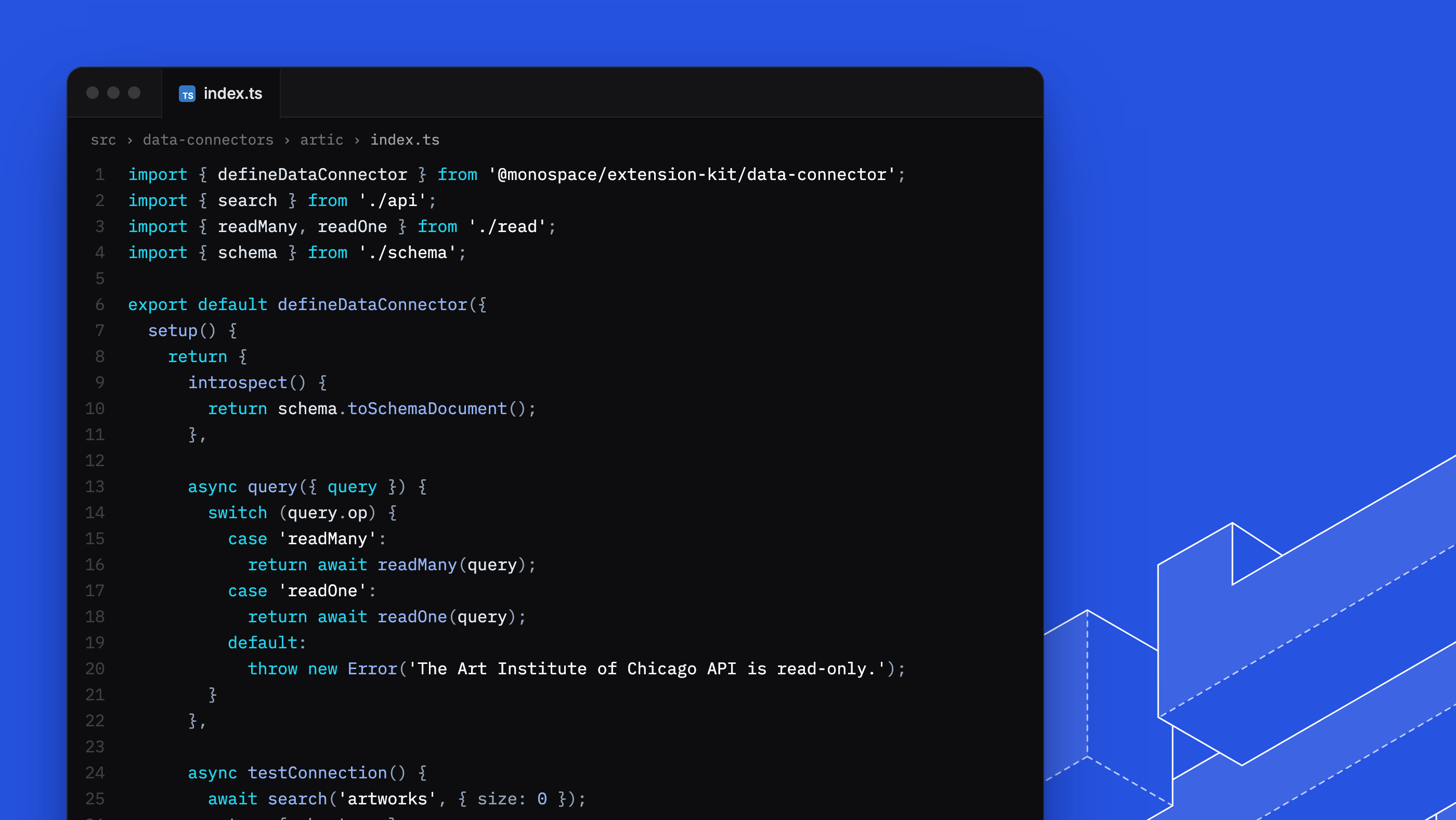
To build your first connector, follow the Data Connector Quickstart. See Data Connectors for the operations contract, Network Permissions for approving hosts, and How Data Connectors Run for the sandbox.
The Docker image scans /monospace/extensions for installed extensions; mount a volume there to add your own. See Install and Manage Extensions.
 Shipped byHannes KüttnerShipped byPrzemyslaw Hugh Kaznowski
- An extension data source whose extension is missing or fails to start no longer prevents startup. It rejects requests until the extension is reloaded.
- The data model of an extension data source is read-only in Studio; you can still change its API names.
- Extension data sources show their connector's icon.
The Monospace CLI and an API explorer
This release adds the Monospace CLI and an API explorer to Studio. It also returns 64-bit integers as strings and closes system collections to the items API.
/items, and decimal types in schema migrations take a kind. Follow the upgrade steps below before upgrading.The Monospace CLI
The new @monospace/cli package gives you one monospace command for working with an instance. Sign in once, generate SDK types with monospace sdk generate, and scaffold and build data connector extensions. The CLI reads credentials from a flag, an environment variable, or your OS keychain, and rejects a project config file that sets one.
See CLI for every command, and SDK Installation for type generation.
Shipped byHannes KüttnerExplore the API from Studio
You can now build read requests against your collections from Studio's Connect page. Choose fields, filters, sorting, pagination, and related collections through include, then send the request and inspect the response. Each request is also available as SDK, cURL, or HTTP code to copy into your project. The explorer replaces Studio's API Reference page and the code snippets panel on listings and items.
The explorer requires the openApiSchema:read workspace entitlement and the systemOpenApiSchema:read organization entitlement. See Permissions.
 Shipped byRijk van Zanten
1. Handle 64-bit integers as strings
Values of int64 and uint64 fields are returned as decimal strings, so 42 arrives as "42". This covers bigint columns on PostgreSQL, MySQL, and MariaDB data sources, including primary and foreign keys, and system fields such as a file's fileSize. Requests still accept a number or a string.
Use BigInt() for exact arithmetic, or Number() only where values stay within Number.MAX_SAFE_INTEGER, and regenerate SDK types: 64-bit fields become string in results and string | number in inputs. See Integers.
2. Stop reading system collections through /items
Requests to a system collection through /api/{workspace}/items/..., such as MonospaceFile, return 422. The workspace OpenAPI specification no longer lists them. Read a workspace file's metadata through the file field that references it. See Files & Assets.
3. Tag decimal types in schema migrations
A decimal type's params now take a kind: { "kind": "constrained", "precision": 10, "scale": 2 } or { "kind": "unconstrained" }. Migrations that send precision and scale without kind fail. See Field Types.
4. Generate SDK types with the Monospace CLI
Install @monospace/cli as a development dependency, then run monospace sdk init and monospace sdk generate in place of monospace init and monospace generate. monospace validate has no replacement; monospace whoami shows the instance, workspace, and credential the CLI uses. See SDK Installation.
Other client-visible changes
- Required to-one relations that point into a different data source are typed as nullable in the OpenAPI specification and generated SDK types. Responses already returned
nullwhen the related item was missing. - Extension data sources created on 0.6.0 store their configuration in a format 0.7.0 does not read.
- Studio offers only the controls each collection's API accepts, across forms, relation inputs, filters, search, sorting, and table columns.
- PostgreSQL
numericcolumns without a declared precision and scale are imported as unconstrained decimals and keep the scale each value was written with. You can also create unconstrained decimal fields from Studio. - Monospace tests a data source's connection before introspecting it.
- Request a connector Monospace does not offer yet from the Add Data Source page.
- Adding a data source selects every collection in the namespaces you include; clear the ones to leave out.
- Removing a collection together with its data in the data source requires typing the collection's database name.
- The listing header adapts to its width; views that do not fit move into a menu.
- Selecting your avatar opens your profile settings. Log out moves to the workspace switcher menu.
- Studio hides organization settings you lack the entitlement to use.
- Field pickers and filter menus no longer compute every relation path when they open, which keeps them responsive on schemas with many relations.
- Signing in with SSO enters Studio without a second page load.
- New installations name the organization "Monospace".
- Fixed members without access to the organization's member list not being taken to their workspace after signing in.
- Fixed Data Model sending members who cannot edit the data model back to Content.
- Fixed decimal fields in Studio accepting values that are not valid decimals.
- Fixed a filter clause without a value being saved with the listing and restored with an empty operator.
- Fixed listings automatically retrying requests that failed with an internal server error. Listings retry only when the server is unreachable or returns
502,503, or504. - Fixed customizing the same page twice failing, and customized sidebar titles and icons reverting.
- Fixed an empty extra row after creating a related item in a many-to-many field, and a leftover related item after deleting one.
- Fixed deleted collections, fields, relations, indexes, and namespaces remaining in Data Model lists after a schema refresh.
- Fixed existing organization users added to a workspace not appearing in its member list until you reloaded.
- Fixed refreshing a schema a second time failing after you dismissed the review.
- Fixed creating a workspace from organization settings breaking the workspace layout.
- Fixed the onboarding popup overflowing a narrowed sidebar.
- Fixed tooltips reopening when a dialog closed.
- Fixed Monospace emails carrying an extra copy of the logo that Gmail listed as an attachment.
Cached reads, multiple replicas, and a new syntax for relational queries
This release adds read caching, multiple replicas, selective data source introspection, composite primary keys, and member suspension. Relational queries now use include instead of deep.
Reads are cached by default
Monospace now caches read queries. Query planning tracks which fields each cached result uses, so writes invalidate only results that depend on the changed fields. Other results stay cached, even in a collection with frequent writes.
Shipped byBram GeronShipped byHannes KüttnerRun more than one replica
You can now run multiple Monospace replicas against the same system database. Replicas coordinate metadata writes and share changes to workspaces, schemas, and sign-in providers. A replica that misses a change repairs its metadata automatically.
/api/system/ready reports whether a replica's metadata is current, so an orchestrator can stop routing requests to a replica with an outdated schema.
MONOSPACE_SYSTEM_FILE_STORAGE__SHARED=true for shared local storage), or disable clustered mode with MONOSPACE_CLUSTER__ENABLED=false. Shipped byMaxence MaireShipped byBram Geron
Relational queries use include
Select related data with include instead of dot-notation paths in fields. Each relation has its own query with fields, filter, sort, limit, offset, and nested include options. The query structure is the same at every level:
?fields=id,title
&include[author][fields]=name
&include[author][include][comments][fields]=body
&include[author][include][comments][limit]=5
Use responseName:sourceField to alias both field names and relation keys.
deep and dot-notation paths in fields are removed, not deprecated. Rewrite nested reads before upgrading; the upgrade steps below cover the syntax and errors from old queries.Shipped byRijk van ZantenShipped byHannes KüttnerChoose what a data source brings in
You can now choose which namespaces and collections to import when connecting a data source. Monospace remembers the collections you exclude. Before applying a schema refresh, you can review changes to existing collections, newly discovered collections, and previously excluded collections.
The review lists each change to existing collections, and all of those changes are applied. Re-scans update only the Monospace model; they never alter your data source. See Introspection.
 Shipped byGaetan SENNShipped byReza Baar
Composite primary keys and generated values
You can now create collections with composite primary keys and generate key values as UUIDs or auto-incrementing integers. Monospace also populates the standard Created At, Updated At, Created By, and Updated By fields as you create and edit items.
 Shipped byMarc Backes
 Shipped byKirill Bulatov
Filter on related items and the current user
You can now filter on related items in the Studio, such as an author's posts or a customer's orders. Select Current User in a user-field filter to match whoever is signed in. The same saved filter or policy rule then applies to each person.
Shipped byMarc BackesAPI keys that never expire
You can now issue API keys that remain valid until you revoke them, for integrations and service accounts. Keys still expire by default; disable expiry for each key that needs it.
Shipped byGaetan SENNSuspend a member
You can now suspend a member while keeping their existing memberships. Suspension blocks password sign-in, SSO, token refresh, and API keys, and immediately revokes the member's sessions. Already-issued access tokens remain valid until they expire.
Suspend or reactivate members from the organization's members panel or through PATCH /api/system/users/{user_id}/status. The panel lists suspended members separately, and reactivation restores access with their existing API keys.
Suspended members cannot receive workspace invitations or be added as members. You cannot suspend yourself or the last active organization admin.
Shipped byGaetan SENNBack up your system database and file storage before upgrading. Some changes cannot be reversed after Monospace starts on 0.6.0.
1. Rewrite relational queries
Rewrite every client query that uses deep or dot-notation paths in fields before upgrading.
Monospace silently ignores deep. A dotted path in fields fails with 422 Unknown output field, naming the path without identifying the syntax change. Search for deep[ and dots inside fields to find affected queries.
Each relation becomes an include entry holding a complete query of its own. Relation arguments lose their underscore prefix; filter operators keep theirs.
# before
?fields=id,title,author.name&deep[author][_filter][active][_eq]=true

# after
?fields=id,title&include[author][fields]=name&include[author][filter][active][_eq]=true
fieldsselects scalars only — a relation named inincludeis selected implicitly.- One
includehop per relation:a.bbecomesinclude[a][include][b]. - In raw REST requests, every
includemust select something. Where you relied on an implicit default, writefields=*explicitly. - Aliases use
responseName:sourceField, on both field names andincludekeys.
For the SDK, regenerate the client with npx @monospace/sdk generate, then move relation options out of fields into a sibling include. The fields type now accepts only strings, so relation options left there cause a compile error.
2. Add Redis, or turn caching off
Caching is on by default and requires Redis or Valkey. Set MONOSPACE_REDIS__URL, or set MONOSPACE_CACHE__ENABLED=false.
3. Set a license key, or stay within the Starter limits
Monospace now runs under a license. Without MONOSPACE_LICENSE__KEY, the instance uses the built-in Starter license. If we are already working with you, contact us to obtain a trial license to maintain your configuration before upgrading, or reduce usage to within the Starter limits. See Licensing.
4. Prepare your access model
Reduce each workspace to one public role. The migration stops startup if it finds more: Workspace <name> has more than 1 public role. Only 1 is allowed. Please resolve manually.
Record your role hierarchy. Role inheritance is removed; each role keeps only its directly attached policies. The migration drops the closure table and parentId, so you cannot recover the hierarchy afterwards. Export it before upgrading, then attach each ancestor's policies directly to the roles that inherited them.
5. Account for stored file paths
System files now use paths under system/, and workspace files use paths under workspaces/<uuid>/. Existing files remain at the storage root; there is no migration or supported relocation procedure. Their metadata remains, but asset reads fail because the files are missing from the new paths.
Back up your files before upgrading, and account for the loss of access until they are moved.
Other client-visible changes
- Shutdown settings use
MONOSPACE_SHUTDOWN_DRAIN_DELAYandMONOSPACE_SHUTDOWN_GRACE_PERIOD. OldMONOSPACE_CLUSTER__SHUTDOWN_*settings are silently ignored, leaving the defaults in effect. - Operations that would exceed a license limit return
402with codes6001–6008, and reading audit logs on the Starter license returns402. See Licensing. - Reading organization members and invitations now requires an organization-admin entitlement. Non-admin integrations receive
403fromGET /api/system/users,/api/system/users/{id}, and/api/system/invites. PATCH /api/system/api-keys/{id}rejects unknown body fields, so an update that echoes the key'sidback now fails with422.- Anonymous calls to organization endpoints return
401where several previously returned403,500, or200with a per-item error. - Assets outside a small allow-list download instead of displaying. See Content Type Handling.
- Boolean environment variables accept common true and false spellings regardless of capitalization;
config.yamlstill requires YAML booleans. See Environment Variables. - Relations carry on-delete and on-update referential actions. Existing relations keep their current behavior.
- Relate an item to a workspace member with the new user field type, which supports many-to-one, one-to-one, and many-to-many relations.
- The data model overview replaces the visualizer as the Data Model landing page. Bookmarks to the old visualizer URL no longer resolve.
- Listings automatically retry failed requests, recovering from temporary errors or an unreachable server without a manual refresh.
- Relations can point at any unique field, not only the primary key.
- Edit a field directly from the table layout.
- Form fields mark unsaved changes, and relation fields let you revert those changes.
- Copy a complete audit log event as formatted JSON.
- Assign workspace roles when you create a service account, and include workspace roles in an organization invitation.
- Open a file directly after uploading it, and close asset details in place.
- Choose between UUID v4 and v7 for a generated UUID value.
- Selecting a single item uses radio controls, navigable with the arrow keys.
- Adding a filter opens the filter bar on the new clause. Adding a filter group opens the new group or reopens the existing one without nesting another.
- Member and asset timestamps show as relative time.
Cache-Controlis allowed by default in CORS requests. Add it yourself if you configure your own list of allowed headers. See CORS.- Switching between Content and Data Model keeps you on the same collection.
- Cards and calendar layouts use the collection's display template for item titles.
- Right-click a cell in the table layout to copy its raw value or filter the listing down to that value.
- New OpenAI connections default to GPT-5.6 for chat and GPT-5.6 Luna for fast tasks. Existing configurations are unchanged.
- Open related items directly from to-many relation fields in an item's form.
- Expand the upload progress card to see progress per file and open uploaded files.
- Color fields show their hex value beside the swatch in listings, and fall back to a tooltip when the column is narrow.
- Breadcrumbs fold into a menu as the header narrows, along with the workspace and space switchers.
- Badges render as pills by default, including badge blocks previously set to square.
- Relation setup shows a diagram of the relation type next to its explanation.
- Hide a relation field from Studio forms by default, matching the control primitive fields already had.
- Remove a collection from its overview, not only from the collections list.
- A field's display name, API name, and database column name appear together at the top of the form; the column name moves out of Advanced.
- Fixed empty states offering a create button you did not have permission to use.
- Fixed uploaded files being served with content types that allowed them to execute in a visitor's browser under your domain. Only allowed image, audio, video, and plain-text formats display inline; other formats, including HTML and PDF, download with no opt-out. See Content Type Handling.
- Fixed creating or updating an API key silently accepting unknown fields in the request body. An update that sends the key's
idback is now rejected. - Fixed malformed policy rules silently granting unrestricted access instead of being rejected.
- Fixed any signed-in user being able to delete system files — member avatars, the organization logo, and workspace logos. Deleting one now requires the
file:deleteorganization entitlement. - Fixed policy item rules, field rules, validation rules, and entitlements being cleared when the Workspace Administrator toggle was switched on and back off.
- Fixed being signed out after sitting idle even though your session could still be refreshed, and being unable to sign out once your session cookie had expired.
- Fixed a member's detail form rendering empty after you removed one of their roles.
- Fixed a filter containing one incomplete clause either ignoring its other clauses or matching nothing at all.
- Fixed a filter input disappearing after its value was cleared, leaving the filter uneditable.
- Fixed switching workspaces showing one workspace's data or permissions under another's URL. The schema, permissions, routes, and cached data now update together.
- Fixed typing
/in a display template only opening the field list after a space. - Fixed menus opened from the sidebar rendering behind it on narrow viewports.
- Fixed formatted-value display options appearing unset instead of showing their real defaults.
- Fixed the API key card on the Connect page going blank on load and when switching methods.
- Fixed a spurious unsaved-changes prompt when moving between settings sections or closing the overlay.
- Fixed the sort control in the organization workspaces list showing an incorrect label.
- Fixed the AI chat jump-to-latest button being covered by the loading spinner while the assistant responds.
- Fixed deletion failing for collections involved in relations.
- Fixed select fields showing their raw stored value and color fields showing a bare hex string in listings, instead of a label chip and a swatch.
- Fixed editing a field's display name overwriting a manually edited database column name and generating names that ignored the workspace naming convention.
- Fixed changing a field's database column name silently rewriting its API name.
- Fixed the members list showing a role count that did not match the member's roles.
- Fixed workspace URLs containing non-ASCII characters in some browser languages.
- Fixed generating a UUID failing on instances served over plain HTTP, and the generate button ignoring the field's configured UUID version.
- Fixed entries at the top of the left navigation becoming unreachable in short browser windows.
- Fixed the data model overview opening off-center and looking empty on a first visit.
- Fixed clearing the brand color making every subsequent save fail with "Color must not be null".
- Fixed listing columns resetting to their defaults when you resized a column.
- Fixed the field drawer closing as soon as you picked a field type.
- Fixed number inputs losing precision when stepped up or down.
- Fixed dates, relative times, and numbers appearing in the wrong language. Numbers are also parsed in your region's format, so a German browser reads
1,5as one and a half. - Fixed data source connections failing when the database user lacked access to one of its schemas. Inaccessible schemas are now skipped.
- Fixed partitioned PostgreSQL tables appearing as a separate collection per partition.
- Fixed field deletion silently dropping a multi-field index on PostgreSQL. The request now fails and names the index you must update or delete first.
- Fixed to-many relation fields crashing instead of displaying related items.
- Fixed error screens crashing instead of letting you recover.
- Fixed the date picker's Now button showing a raw translation key.
- Fixed failed emails retrying indefinitely instead of being set aside after repeated attempts.
- Fixed organization members, pending invitations, assigned roles, assigned policies, and the policies list showing only their first 100 entries, with no way to reach the rest.
- Fixed entries repeating or disappearing as you paged through organization members and service accounts.
- Fixed listings staying on an empty page after you deleted its remaining items.
- Fixed row actions being unreachable on touch screens, where they appeared only on hover.
Guided onboarding, AWS IAM authentication, and date and time fields
This release adds a guided setup walkthrough for new instances, AWS IAM authentication for RDS and Aurora data sources, first-class filtering and display for date and time fields, audit logs for role and policy changes, and lifecycle endpoints with graceful shutdown.
Set up your instance with a guided walkthrough
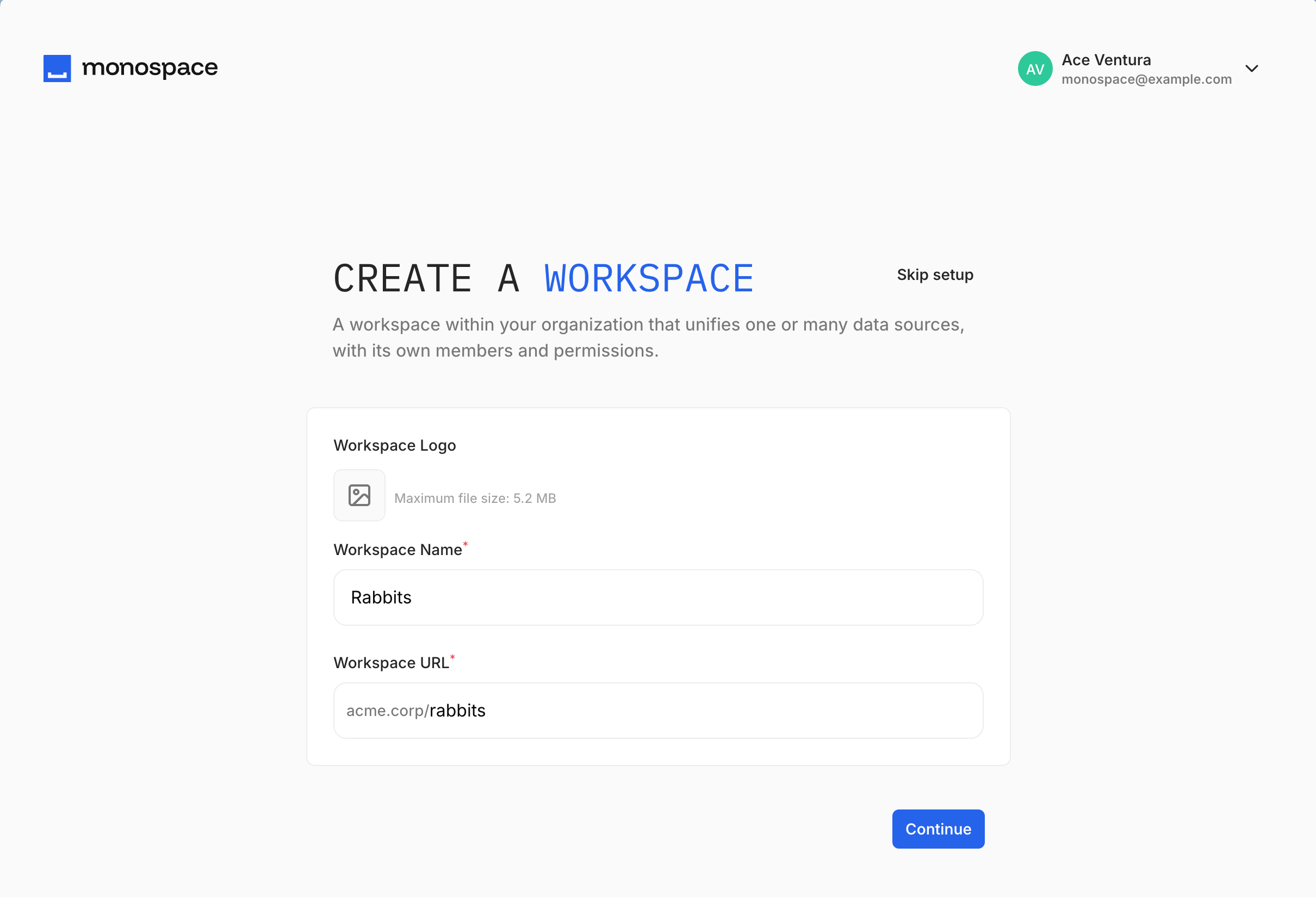
Creating your first account leads into a three-step setup: name your workspace and pick its URL, connect a data source, then collect your connection details. Your progress is kept if you reload the page partway through.
Shipped byMarc Backes Shipped byJon Bellamy
 Shipped byVicky Chen
AWS IAM authentication for RDS and Aurora
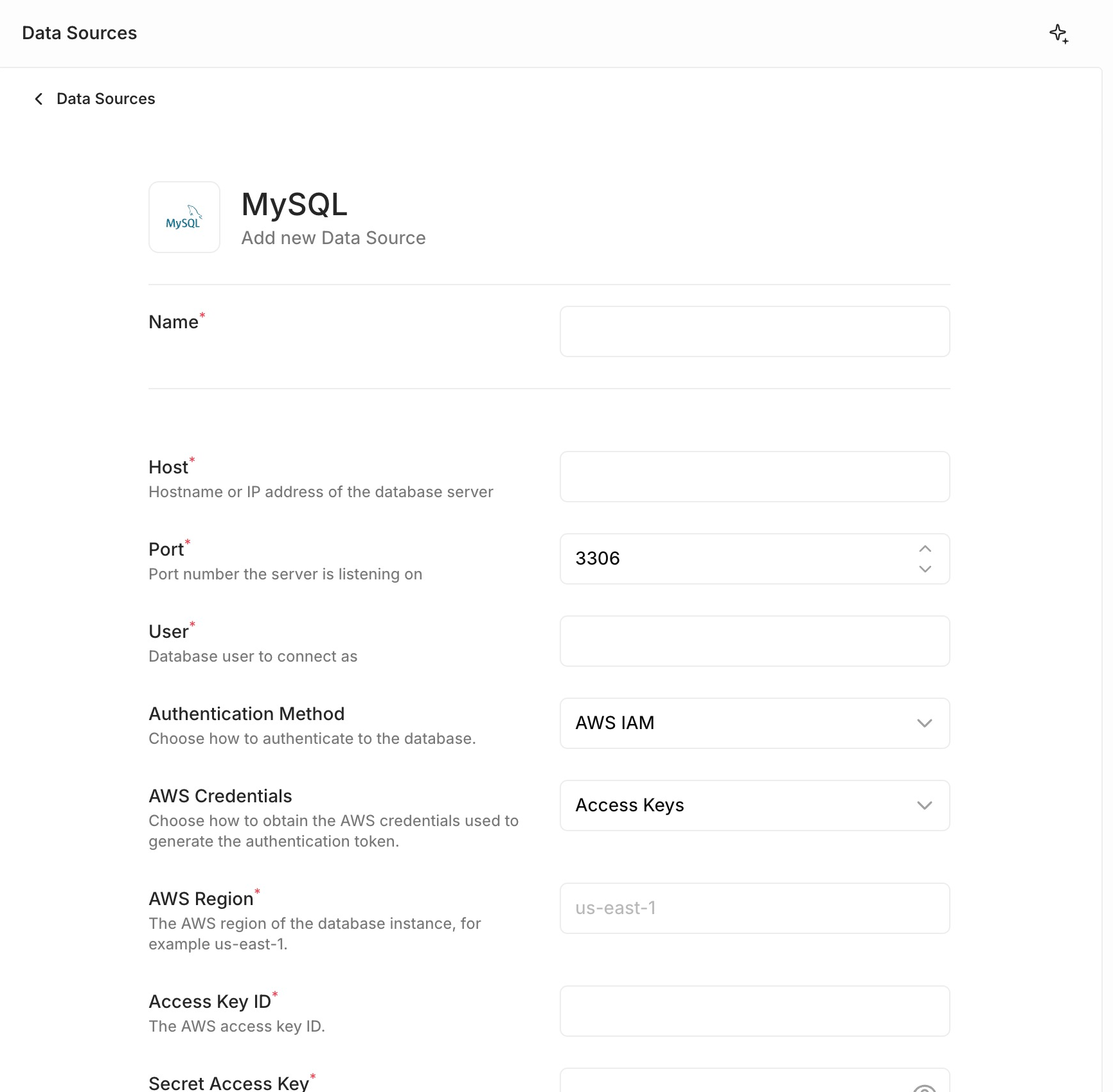
You can now authenticate a PostgreSQL, MySQL, or MariaDB data source to Amazon RDS or Aurora with AWS IAM instead of a database password, configured in the Studio rather than by hand-editing connector config. Choose AWS IAM as the authentication method, supply an AWS region, and either enter an access key pair or let the runtime environment provide credentials — an EC2 instance profile, EKS/IRSA web identity token, ECS task role, AWS SSO, or a shared profile. An optional role ARN is assumed on top of either. Each connection mints a short-lived token, TLS is pinned to verify-full, and the correct regional Amazon RDS certificate authority is trusted from an embedded bundle, so you no longer download the RDS CA PEM and set ssl.ca_cert by hand.
See PostgreSQL and MySQL & MariaDB for connector options.
Shipped byPrzemyslaw Hugh KaznowskiShipped byReza BaarDate and time fields you can filter and format
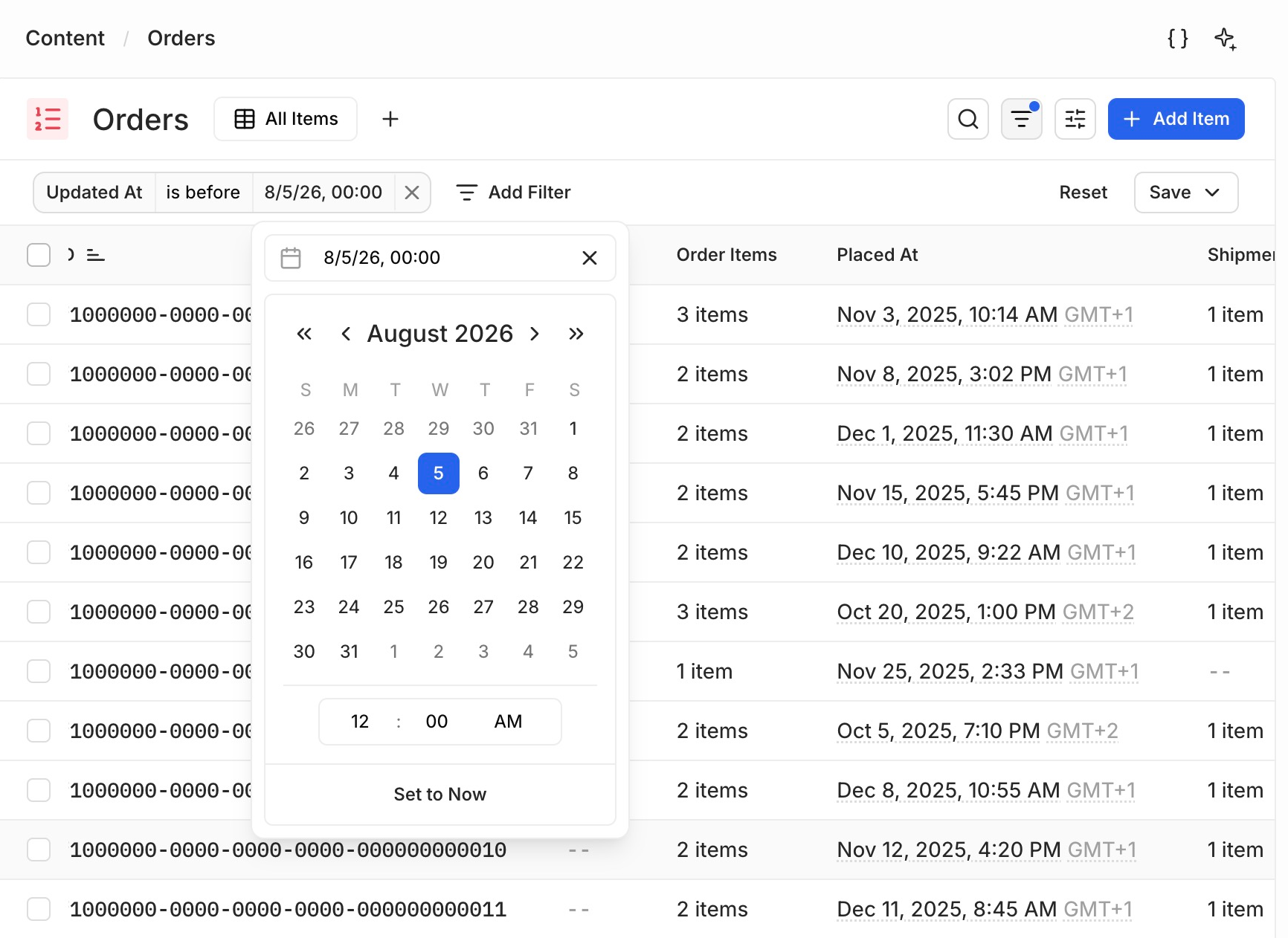
You can now filter date, time, and date-time fields with calendar and time pickers, and choose how each one renders from Appearance on the field. Dates and date-times show either an absolute value, from short to full length, or a relative one that reads as "5 days ago" with the exact timestamp in a tooltip. Integer columns holding epoch milliseconds are handled as timestamps too, including 64-bit values beyond JavaScript's safe integer range.
See Filtering for operators and their request shape.
Shipped byHannes KüttnerEmoji icons for collections and views
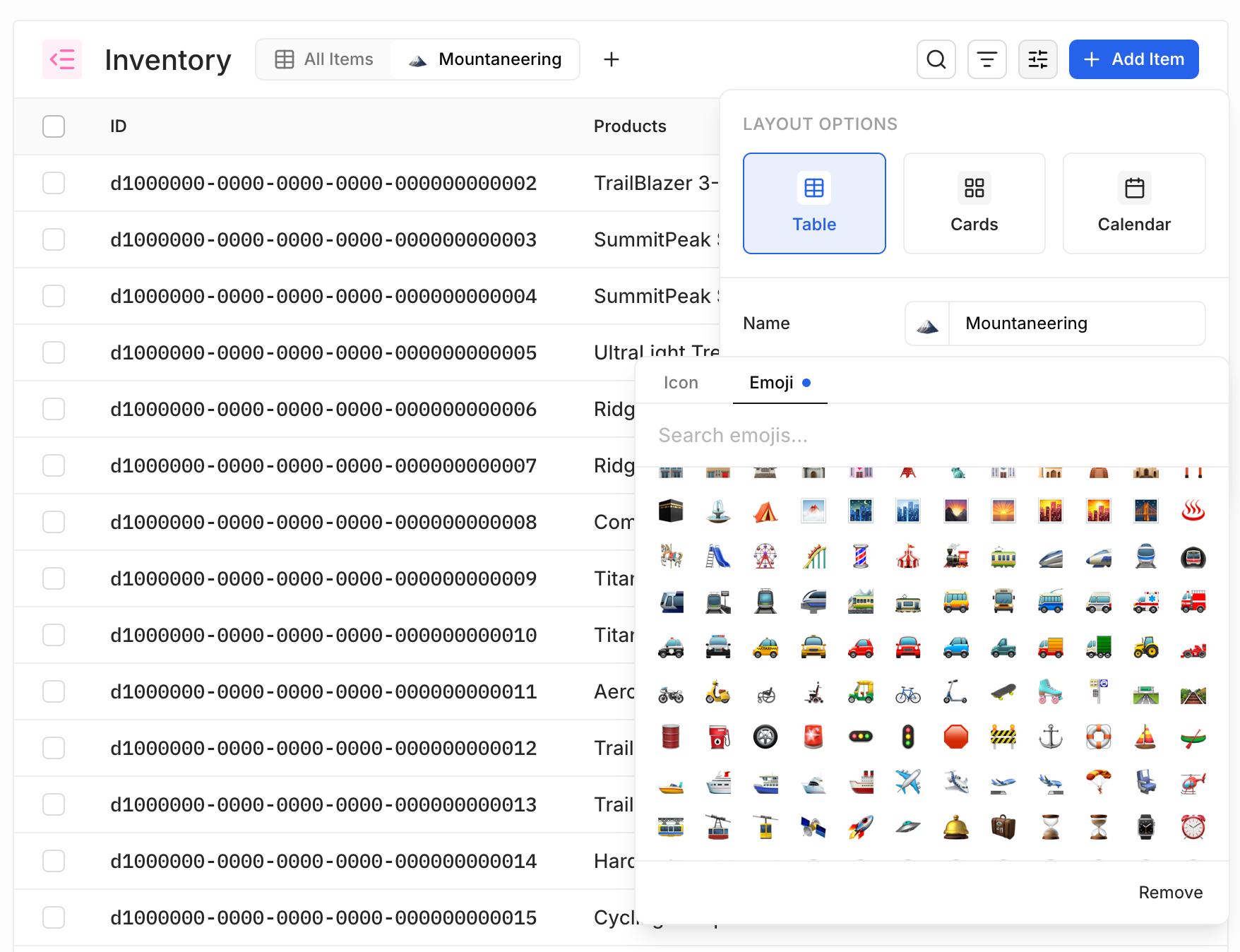
You can now set a collection's or a view's icon to an emoji instead of an icon from the library. Pick one from Appearance on a collection, where the icon also takes a background color, or beside the name when you create or rename a view.
Shipped byHannes KüttnerAudit logs for roles and policies
The audit log records role and policy changes: role.create.v1, role.update.v1, role.delete.v1, role.assign.v1, and role.unassign.v1, plus the matching policy.* actions. Policy entries carry the entitlements each change granted and revoked, and assignment entries record the role and user involved. Every action in the audit log now has a readable label and appears in the action filter, including the authentication actions added in 0.4.0.
See Audit Logs for the full list of actions and how to query them.
Shipped byMaxence MaireShipped byHannes KüttnerLifecycle endpoints and graceful shutdown
Every instance serves GET /api/system/live and GET /api/system/ready, both unauthenticated. /api/system/live always returns 200. /api/system/ready returns 200 once startup finishes and the system database responds, and 503 otherwise, with a per-check breakdown of accepting_traffic, startup, and system_db. On SIGTERM or SIGINT the engine marks itself not ready, stops accepting new connections, and drains in-flight requests, forcing exit after a 30-second grace period. Set MONOSPACE_CLUSTER__SHUTDOWN_DRAIN_DELAY to keep serving for a fixed window after readiness starts failing, so an orchestrator can take the instance out of rotation before the listener closes.
Shipped byMaxence MaireStricter API names
An API name starts with a letter and contains only letters, digits, and underscores. Introspection derives one for you: unicode is transliterated to ASCII, your workspace's naming convention is applied, and a leading digit is prefixed with n — a source collection named 2024 sales becomes n2024Sales, and café table becomes cafeTable. Existing API names keep working; only names you create or edit are validated.
See API Names for the rule and how names are derived.
Shipped byGaetan SENN- The table layout scrolls smoothly through collections with thousands of items and dozens of columns.
- Organization and account settings open as an overlay on top of your current workspace instead of navigating away to separate pages, and the workspace header gains a switcher listing your workspaces.
MONOSPACE_ENABLE_OTEL_EXPORTexports OTLP metrics alongside traces: query duration, in-flight queries, and connection-pool state per data source, plus HTTP request duration and in-flight request count. See Observability.- Filter a collection straight from its table: the column header menu has a Filter… action that seeds a clause on that column, opens the filter bar, and moves you to the operator and value.
- Users carry a
lastActivityAtfield, stamped on every login and token refresh and filterable and sortable like any other field. The workspace Members list shows it as a Last activity column. - Files carry
createdAtandupdatedAt, both filterable and sortable. Existing files are backfilled with the migration timestamp, so original upload times are not recoverable. - The engine version, and its build revision when available, appear at the foot of the settings sidebars and in the
/api/system/inforesponse for authenticated callers. - MCP agents discover the workspace's built-in system database by passing
includeSystemtoread_data_sources, and can create collections on it without naming a namespace. - New Tabs and Collapsible layout blocks, a Notice block, and a semantic color picker that maps to your theme's
neutral,primary,success,info,warning, anderrortokens. - Block options across the library carry real labels instead of names derived from their property —
modelValuereads as Value,collectionIdas Collection,fieldIdas Field. Text blocks are edited in place in the block editor. - The block library drops the Image and Button blocks, and input blocks no longer take a
coloroption — set color on the surrounding layout instead. - Adding a data source whose collection names collide with existing collections deduplicates the API names instead of failing.
- New fields appear in the order you create them rather than alphabetically.
- System collections display as Policies, Roles, and Members instead of their raw API names.
- Workspace members settings suggests both active and pending members as soon as you focus the input, marking pending invitees as unavailable.
- A workspace cannot be named
systemorauth, which previously produced a workspace shadowed by engine routes. - A collection with no primary key shows a notice explaining that items cannot be read or written until one is set.
- A listing whose primary key you cannot read shows a No Queryable Fields empty state instead of retrying a failing query.
- Fixed a tab left idle losing your work — the access token now refreshes at three quarters of its lifetime instead of after it has already expired, and returning to a backgrounded tab triggers a catch-up refresh.
- Fixed signing out not ending the session: a refresh landing mid-logout no longer leaves you signed back in on reload, and the previous user's cached data is cleared from the tab.
- Fixed
_everyon a to-many relation ignoring related items whose filtered field is null. Such an item now excludes its parent, so filters that previously matched them return fewer results. - Fixed checkbox multi-select blocks doing nothing when toggled on a field whose value is null, and repeater blocks throwing on a null value.
- Fixed the color picker throwing when opened on a field holding an invalid color. The stored value is left untouched until you enter a valid one.
- Fixed a password manager's inline control dismissing a modal and discarding what you typed.
- Fixed saved views failing to load.
- Fixed
meta.totalCounton MySQL and MariaDB reads that select more than one field. - Fixed picking a field from the toolbar filter menu appearing to do nothing instead of opening the filter bar.
- Fixed a select filter showing an empty row when its stored value is no longer among the field's options. The value now renders and can be cleared.
- Fixed the table layout's empty state Add Item and Reset Filters buttons doing nothing.
- Fixed search not filtering events in the calendar layout, and switching view or date range waiting out a throttle before fetching.
- Fixed an event whose start and end are identical being invisible in week and day views.
- Fixed incomplete filter clauses reaching the query, where a half-filled clause skewed results and left an active-filter badge you could not clear.
- Fixed reordering columns in the table layout resizing them, and gave the last column a resize handle.
- Fixed long collection names truncating in the policy tables.
- Fixed the policy editor hiding collections that carry only validation rules, which made those rules unreachable, and stopped the Create Permission picker offering system collections.
- Fixed the audit log's Action filter seeding
_contains, which rendered the clause incorrectly. - Fixed the override-permissions dialog having no way to back out — it now has Cancel, a close button, and click-outside dismissal.
- Fixed field values clearing while the field drawer closes after a successful create.
- Fixed the create-workspace form reporting validation errors as you tab through it rather than on submit.
- Fixed a full name losing its spaces as you type it in the invite signup form.
- Fixed wizard steps flashing a different step during the redirect after creating a space or page.
- Fixed staged relation rows that overflow the last saved page offering a next page that cannot load.
- Fixed the entitlements drawer showing a bare identifier instead of the space title.
- Fixed row actions on a related item sliding in and clipping on the card edge when you hover the row, and made them reachable by keyboard.
- Fixed Test Connection throwing on a partially filled data source form instead of showing inline field errors.
- Fixed a MySQL or MariaDB connection failing with an unknown authentication plugin error that gave no hint the username may not exist.
- Fixed nested rows staying editable in a read-only filter.
- Fixed content in a resizable split panel reflowing while the panel animates.
- Fixed the loader icon on progress toasts not spinning.
- Fixed test fixture blocks appearing in the block library.
Project to Workspace rename and authentication audit logs
This release renames the core Project resource to Workspace — a breaking change — and adds engine-side audit logging for authentication events, alongside a batch of Studio and API improvements and fixes.
Project is now Workspace
monospace_project_<name>_meta and _data schema to monospace_workspace_<name>_…. The whole script runs in one transaction and takes an ACCESS EXCLUSIVE lock, so run it during a maintenance window.ROLLBACK;
BEGIN;
SET LOCAL lock_timeout = '10s';
LOCK TABLE
monospace_system.monospace_projects,
monospace_system.monospace_project_members,
monospace_system.monospace_invitations,
monospace_system.monospace_migrations,
monospace_audit.audit_logs
IN ACCESS EXCLUSIVE MODE;
-- System tables and columns
ALTER TABLE monospace_system.monospace_projects
RENAME TO monospace_workspaces;
ALTER TABLE monospace_system.monospace_project_members
RENAME COLUMN project_id TO workspace_id;
ALTER TABLE monospace_system.monospace_project_members
RENAME TO monospace_workspace_members;
ALTER TABLE monospace_system.monospace_invitations
RENAME COLUMN project_id TO workspace_id;
ALTER TABLE monospace_system.monospace_invitations
RENAME COLUMN project_roles TO workspace_roles;
ALTER TABLE monospace_system.monospace_migrations
RENAME COLUMN last_project_migration TO last_workspace_migration;
ALTER TABLE monospace_audit.audit_logs
RENAME COLUMN project_id TO workspace_id;
-- Indexes
ALTER INDEX monospace_system.monospace_projects_id_primary
RENAME TO monospace_workspaces_id_primary;
ALTER INDEX monospace_system.monospace_projects_api_name_unique
RENAME TO monospace_workspaces_api_name_unique;
ALTER INDEX monospace_system."monospace_project_members_userId_projectId_unique"
RENAME TO "monospace_workspace_members_userId_workspaceId_unique";
ALTER INDEX monospace_system.monospace_migrations_last_project_migration_unique
RENAME TO monospace_migrations_last_workspace_migration_unique;
ALTER INDEX monospace_audit.audit_logs_project_id_idx
RENAME TO audit_logs_workspace_id_idx;
-- Foreign-key constraints
ALTER TABLE monospace_system.monospace_workspaces
RENAME CONSTRAINT "MonospaceProject_logo_fkey"
TO "MonospaceWorkspace_logo_fkey";
ALTER TABLE monospace_system.monospace_workspace_members
RENAME CONSTRAINT "MonospaceProjectMember_project_fkey"
TO "MonospaceWorkspaceMember_workspace_fkey";
ALTER TABLE monospace_system.monospace_workspace_members
RENAME CONSTRAINT "MonospaceProjectMember_user_fkey"
TO "MonospaceWorkspaceMember_user_fkey";
ALTER TABLE monospace_system.monospace_invitations
RENAME CONSTRAINT "MonospaceInvitation_project_fkey"
TO "MonospaceInvitation_workspace_fkey";
-- Handle installations stopped exactly on renamed migrations
UPDATE monospace_system.monospace_migrations
SET last_system_migration = CASE last_system_migration
WHEN '_20260217_110409_project_settings'
THEN '_20260217_110409_workspace_settings'
WHEN '_20260307_000638_project_timestamps'
THEN '_20260307_000638_workspace_timestamps'
ELSE last_system_migration
END;
-- Rewrite historical audit vocabulary
UPDATE monospace_audit.audit_logs
SET action = CASE action
WHEN 'user.join_project.v1' THEN 'user.join_workspace.v1'
WHEN 'user.remove_project.v1' THEN 'user.remove_workspace.v1'
ELSE action
END
WHERE action IN (
'user.join_project.v1',
'user.remove_project.v1'
);
UPDATE monospace_audit.audit_logs
SET payload = jsonb_set(
payload - 'project_roles',
'{workspace_roles}',
payload -> 'project_roles',
true
)
WHERE payload ? 'project_roles';
-- Rename workspace metadata/data schemas and repair persisted metadata
DO $migration$
DECLARE
item RECORD;
old_data TEXT;
new_meta TEXT;
new_data TEXT;
BEGIN
FOR item IN
SELECT nspname AS old_meta
FROM pg_namespace
WHERE nspname LIKE 'monospace\_project\_%\_meta' ESCAPE '\'
ORDER BY nspname
LOOP
old_data := left(item.old_meta, -5) || '_data';
new_meta := regexp_replace(
item.old_meta,
'^monospace_project_',
'monospace_workspace_'
);
new_data := regexp_replace(
old_data,
'^monospace_project_',
'monospace_workspace_'
);
IF octet_length(new_meta) > 63 OR octet_length(new_data) > 63 THEN
RAISE EXCEPTION
'Workspace schema name exceeds PostgreSQL 63-byte limit: % / %',
new_meta,
new_data;
END IF;
IF to_regnamespace(new_meta) IS NOT NULL
OR to_regnamespace(new_data) IS NOT NULL THEN
RAISE EXCEPTION
'Target workspace schema already exists: % or %',
new_meta,
new_data;
END IF;
EXECUTE format(
'ALTER SCHEMA %I RENAME TO %I',
item.old_meta,
new_meta
);
IF to_regnamespace(old_data) IS NOT NULL THEN
EXECUTE format(
'ALTER SCHEMA %I RENAME TO %I',
old_data,
new_data
);
END IF;
EXECUTE format(
'UPDATE %I.monospace_namespaces
SET db_name = CASE db_name
WHEN $1 THEN $2
WHEN $3 THEN $4
ELSE db_name
END
WHERE db_name IN ($1, $3)',
new_meta
)
USING item.old_meta, new_meta, old_data, new_data;
-- Rename persisted entitlement values
EXECUTE format(
$sql$
UPDATE %I.monospace_policies
SET content = replace(
replace(
content::text,
'"projectMembers:',
'"workspaceMembers:'
),
'"projectSettings:',
'"workspaceSettings:'
)::jsonb
WHERE content::text LIKE '%%"projectMembers:%%'
OR content::text LIKE '%%"projectSettings:%%'
$sql$,
new_meta
);
END LOOP;
END
$migration$;
COMMIT;
The resource you create inside an organization is now a workspace. In the Studio, "Project" becomes "Workspace" everywhere — the navigation selector, settings, members, and invitations. The change is uniform on the wire:
- REST and MCP — the workspace-scoped path is
/api/{workspace}/…(items, assets,openapi,mcp), and the system endpoints move from/api/system/projectsto/api/system/workspaces. - SDK —
createClienttakes aworkspaceoption instead ofproject, and the generator config inmonospace.config.tsusesworkspacetoo. - Fields and payloads —
projectIdbecomesworkspaceId, and invitationproject_rolesbecomeworkspace_roles. - Entitlements —
projectbecomesworkspace,projectMembersbecomesworkspaceMembers, andprojectSettingsbecomesworkspaceSettings. - Audit log —
user.join_project.v1anduser.remove_project.v1becomeuser.join_workspace.v1anduser.remove_workspace.v1.
See Organization for the resource hierarchy and REST API for the request shape.
Shipped byRijk van ZantenAudit logs for authentication events
Monospace now records authentication activity in the audit log: successful and failed logins, logouts, token refreshes, and password reset requests, confirmations, and changes. Each entry captures the actor, their IP address, and the outcome — and failures are recorded without revealing whether an account exists.
See Audit Logs for the full list of actions and how to query them.
Shipped byMaxence Maire- The PostgreSQL connector supports AWS IAM authentication for RDS and Aurora: set an
aws_iamobject (with at least aregion) on the connection instead of a password, and each connection mints a short-lived token. It is configured in the connector config only — there is no Studio UI for it yet. That will come in a subsequent release. - The Studio shows the server's maximum file upload size in the upload UI, and over-limit uploads fail with a clear message instead of a generic error.
- Paginated Studio views use the engine's
meta.totalCountfor exact total-item counts instead of estimating from the last page. - Hide or show a collection directly from its actions menu in the Data Model.
- Listing layouts appear in a consistent order — Table, then Cards, then Calendar — in the view options.
- A to-many relational filter must use exactly one of
_some,_every, or_none; invalid combinations are rejected with a clear message. - When no AI provider is configured, anyone who can set up AI sees a "Set Up AI Assistant" prompt instead of an empty panel.
- Fixed
_eqand_neqon a JSON field comparing raw text instead of JSON value, across PostgreSQL, MySQL, and MariaDB. Object key order is now ignored, while array order and value types stay significant. - Fixed an expired session cookie blocking login, invite signup, and password reset with an invalid-token error.
- Fixed introspecting an unknown data source returning a 500 instead of a 404 with a clear message.
- Fixed the AI chat panel failing silently when a response stream fails.
- Fixed editing a date or date-time field in a form leaving the Save button disabled.
- Fixed the calendar layout loading the wrong events for the week or day in view, including multi-day events and events that span a month boundary.
- Fixed in-browser filtering and sorting comparing date-time and numeric values as text, which misordered those columns.
- Fixed file preview text and action buttons being illegible over the dark-theme overlay.
- Fixed long links overflowing narrow containers such as the code panel instead of wrapping.
API request panels and AI tool approvals
This release adds an API Request code panel to every collection, a tool-approval workflow for the AI assistant, many-to-many file fields, and a total-count option for read queries.
API Request Code Panel
Reproducing a Studio view in code meant hand-writing the request. Now every content collection has an API Request panel that turns what you're viewing — your fields, filter, sort, and pagination, or the open item and its values — into ready-to-run SDK and cURL snippets you can copy in one click. Open it from the code button in the header; it docks beside your content on wide screens and slides in as a drawer on narrow ones.
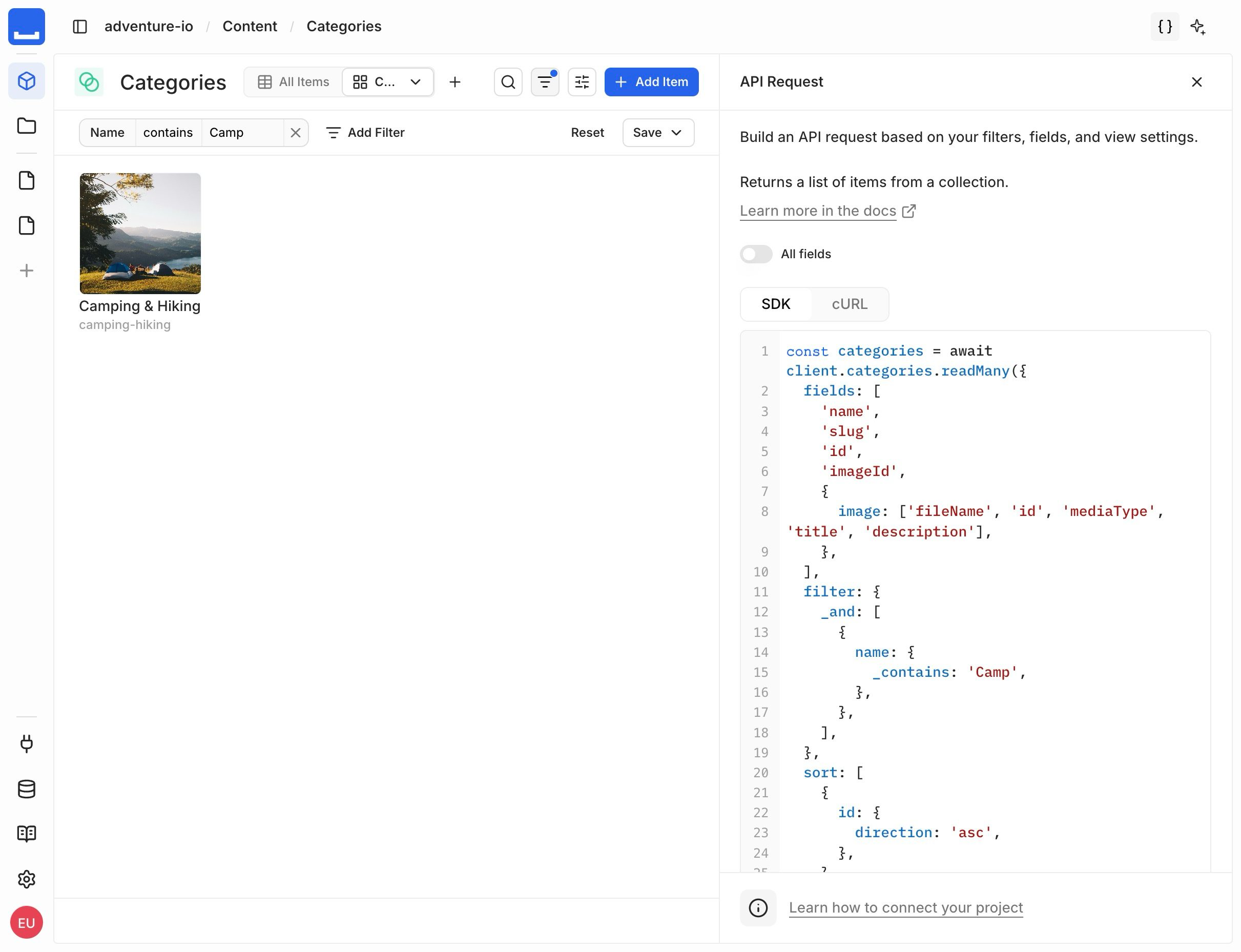
See SDK and REST API for client setup.
Shipped byGuillaume Chau Shipped byHugo TorzuoliShipped byHannes Küttner
AI Assistant Tool Approvals
The AI assistant used to run deletes and schema changes without a checkpoint. Now it pauses first: deleting items or changing the schema surfaces a Tool approval required panel where you approve, deny, or send back a different instruction. Tool inputs and outputs render as readable YAML instead of raw JSON, and approval never grants access beyond your own permissions.
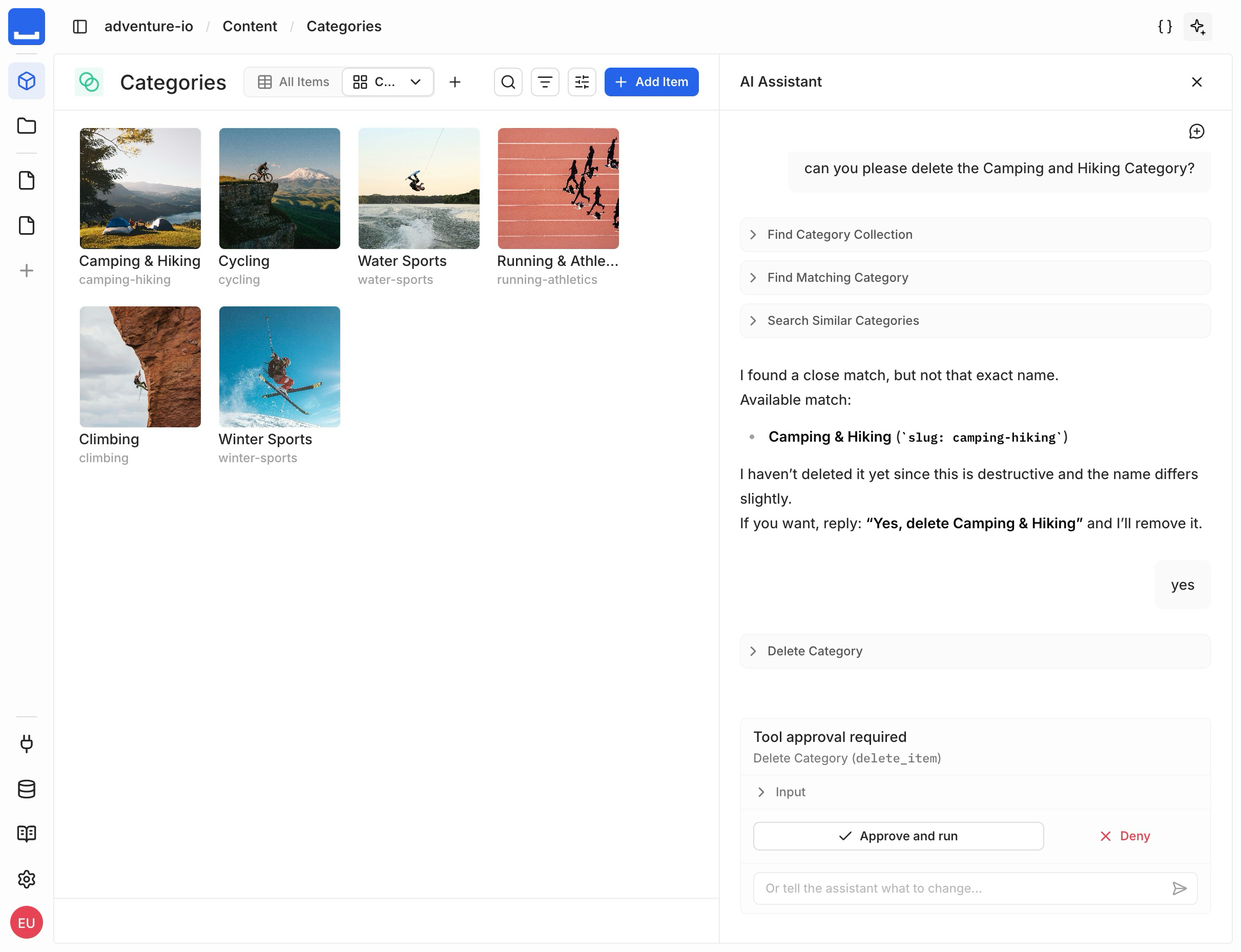
See AI for the assistant and its tools.
Shipped byRijk van ZantenMany-to-Many File Fields
A File field held a single file, so attaching several meant modeling a junction collection by hand. Now picking the Multiple Files option when adding a File field creates a many-to-many relation to your asset library from just a field name — the junction collection is generated and hidden for you, and attached files show as thumbnails in the item form and table.
See Data Model for fields and relations.
Shipped byMarc BackesTotal Count for Read Queries
Getting a total count used to mean a second query — or fetching every matching item just to count them. Now you can pass a meta option with totalCount on a read query to get the total number of matching items — ignoring limit and offset — alongside the data in one request. It's a top-level option; nested relation reads don't accept it.
See Get the Total Count for the request and response shape.
Shipped byKirill Bulatov- UUID fields can default to an engine-generated random UUID, in either v4 (random) or v7 (time-ordered) form.
- Change a relation's on-delete and on-update referential actions with a migration, instead of only when the relation is first created.
- The field type picker is sorted alphabetically by its translated label.
- Fixed new fields ignoring their type template's preferred type, so a JSON-template field was created as text instead of JSON.
- Fixed icon and color inputs on select options not being clearable, and added a "Remove color" action to color inputs.
- Fixed hiding or re-adding a column in the table layout requiring a reload before the header and grid updated.
- Fixed markdown content rendering with the wrong text colors in dark mode.
- Fixed creating a custom page leaving it unconnected to its space.
- Fixed the interface color mode ignoring your saved appearance preference on load.
- Fixed the display-template input closing when a template segment contains a
/. - Fixed onboarding consent not linking to the End User License Agreement.
- Fixed edits to items in a repeater field being dropped instead of registering as you type.
- Fixed the secondary header overlapping content when a long description wraps.
Stricter query validation and access fixes
This release tightens API query validation, makes the policy "All" access override grant full access, and fixes Studio issues across permissions, filtering, and the schema visualizer.
Stricter Query Validation
Invalid field selections on a primitive field used to be accepted silently. Now the query engine rejects them: selecting nested subfields on a primitive field — or passing arguments to one — is rejected as an invalid query. Nested selections and arguments still work on relation fields, where they apply.
See Field Selection for valid field, relation, and nested-query syntax.
Shipped byMaxence MaireAccurate "All" Access Override
A filter left on a single action used to survive the "All" access override, so "All" didn't actually grant full access. Now, in the policy editor, a collection's "All" override grants genuine unrestricted access — it clears any custom per-action filters and opens create, read, update, and delete together.
See Access Control for how policies and collection permissions combine.
 Shipped byFlorian Wachmann
- Fixed permissions failing to load right after you create the first project on a fresh instance, which showed a "couldn't load your permissions" error.
- Fixed newly created collections stacking in the corner of the schema visualizer instead of being arranged automatically.
- Fixed the organization dashboard requiring a manual refresh to show a project you just created.
- Fixed the Policies page occasionally loading blank until you refresh.
- Fixed numeric values being dropped from an "is one of" or "isn't one of" filter.
- Fixed the permission rules editor clipping the delete action on narrow screens instead of scrolling sideways.
A refreshed Studio, onboarding, and native JSON
This release refreshes the Studio, adds guided onboarding and a project connection screen, moves JSON fields to native JSON, introduces branded data source presets and permission-aware controls, and ships configurable CORS, query-parameter authentication, and anonymous usage telemetry.
Refreshed Studio Design
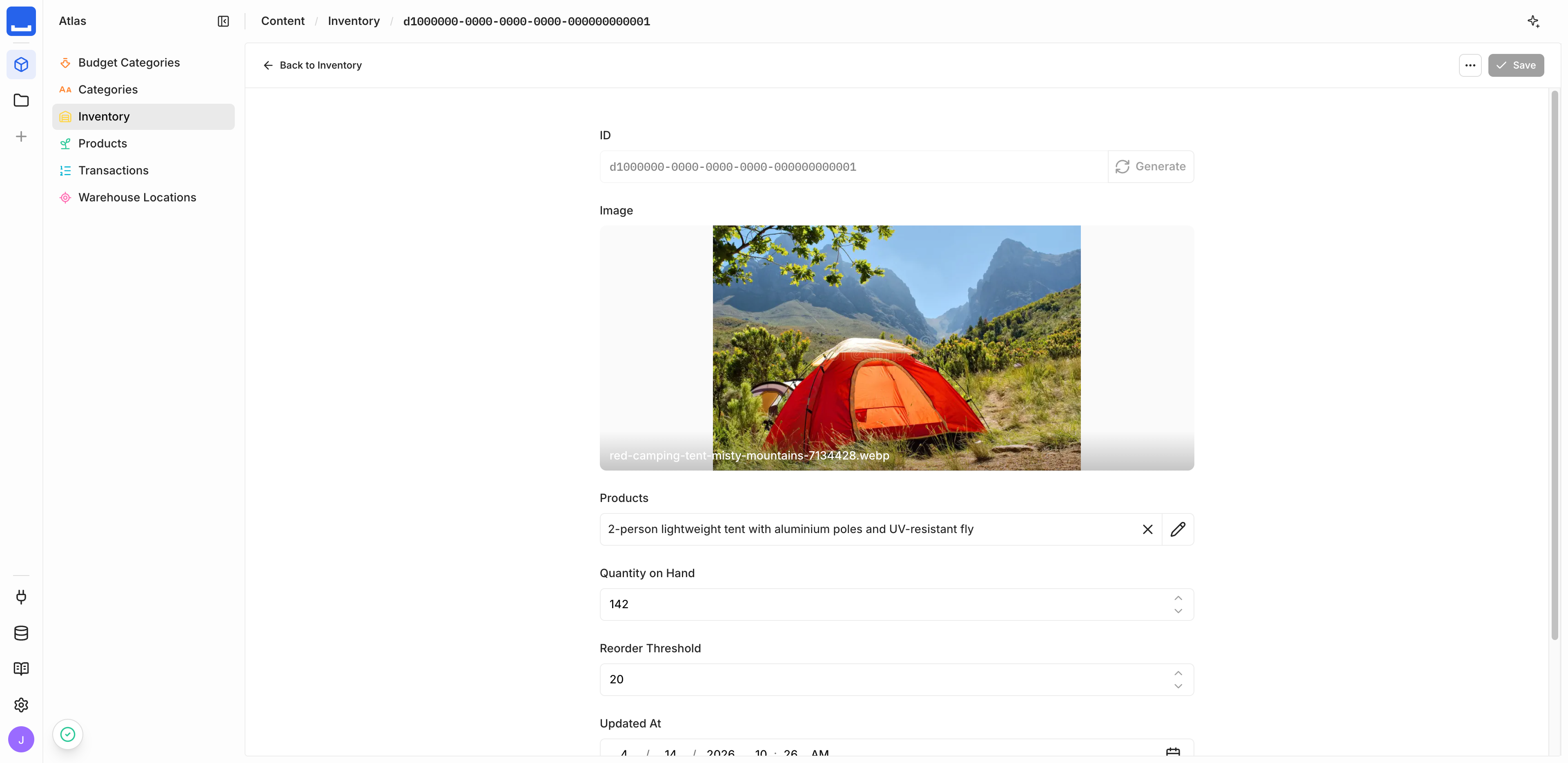
The Studio interface is restyled from the chrome inward. Project headers, the sidebar, and footers use consistent heights, spacing, and typography. Breadcrumbs now show the item you're viewing on a detail page, and the collection back control is labeled with the collection name.
Shipped byHugo TorzuoliShipped byReza BaarShipped byFlorian WachmannOnboarding
New instances walk you through first-run setup. When no user exists yet, Monospace prompts you to create the first administrator — name, email, password, and terms acceptance. When an administrator was provisioned automatically, you confirm your details and accept the terms the first time you sign in.
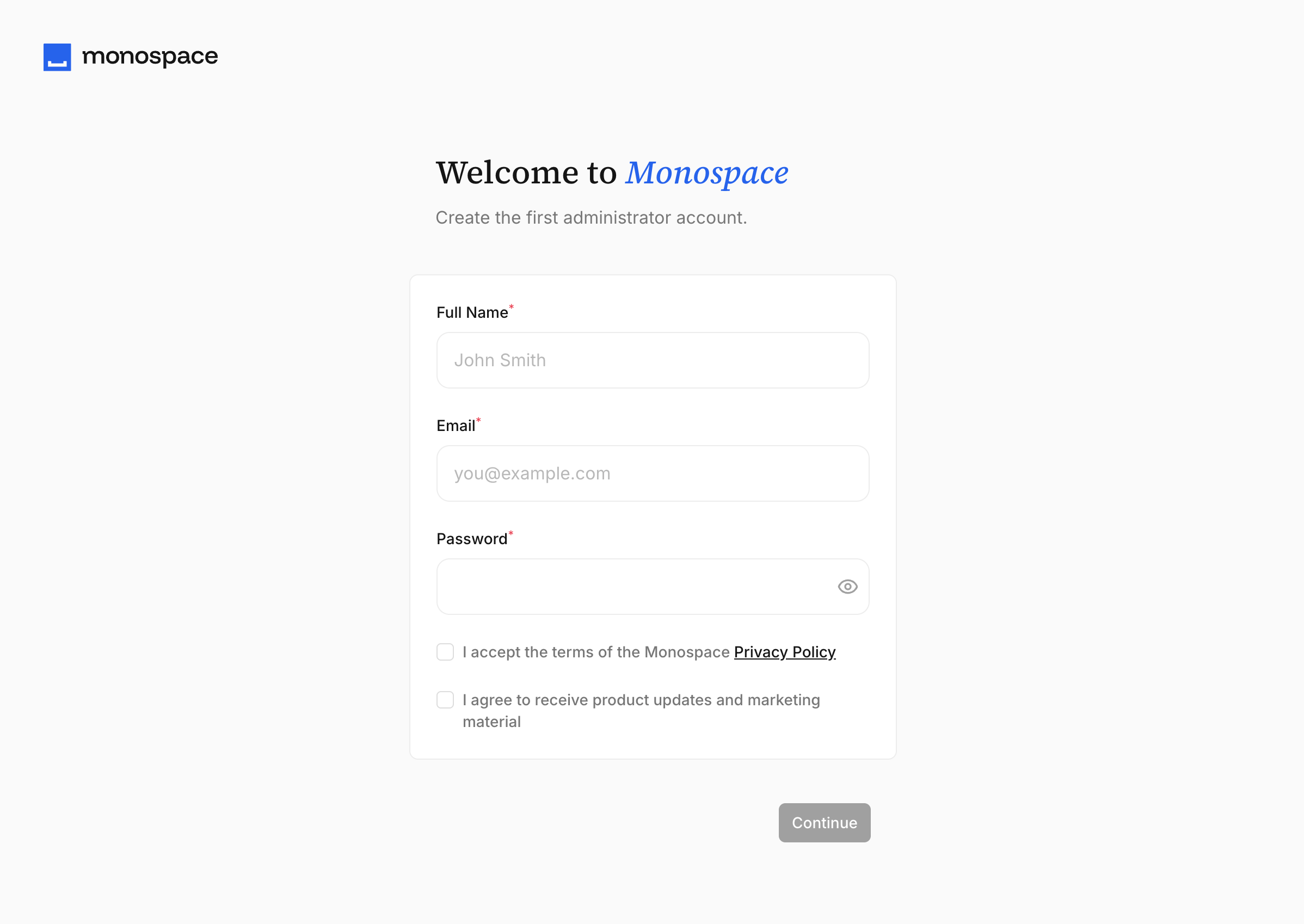
Shipped byMarc BackesConnect to Your Project
Connecting a client to a project used to mean assembling the base URL and minting a key by hand. A new connection screen now gathers everything in one place: tabbed setup instructions for the SDK, MCP server, and REST API, an API key generated on the spot — personal or through a service account — and deep links to add the project's MCP server to supported tools.
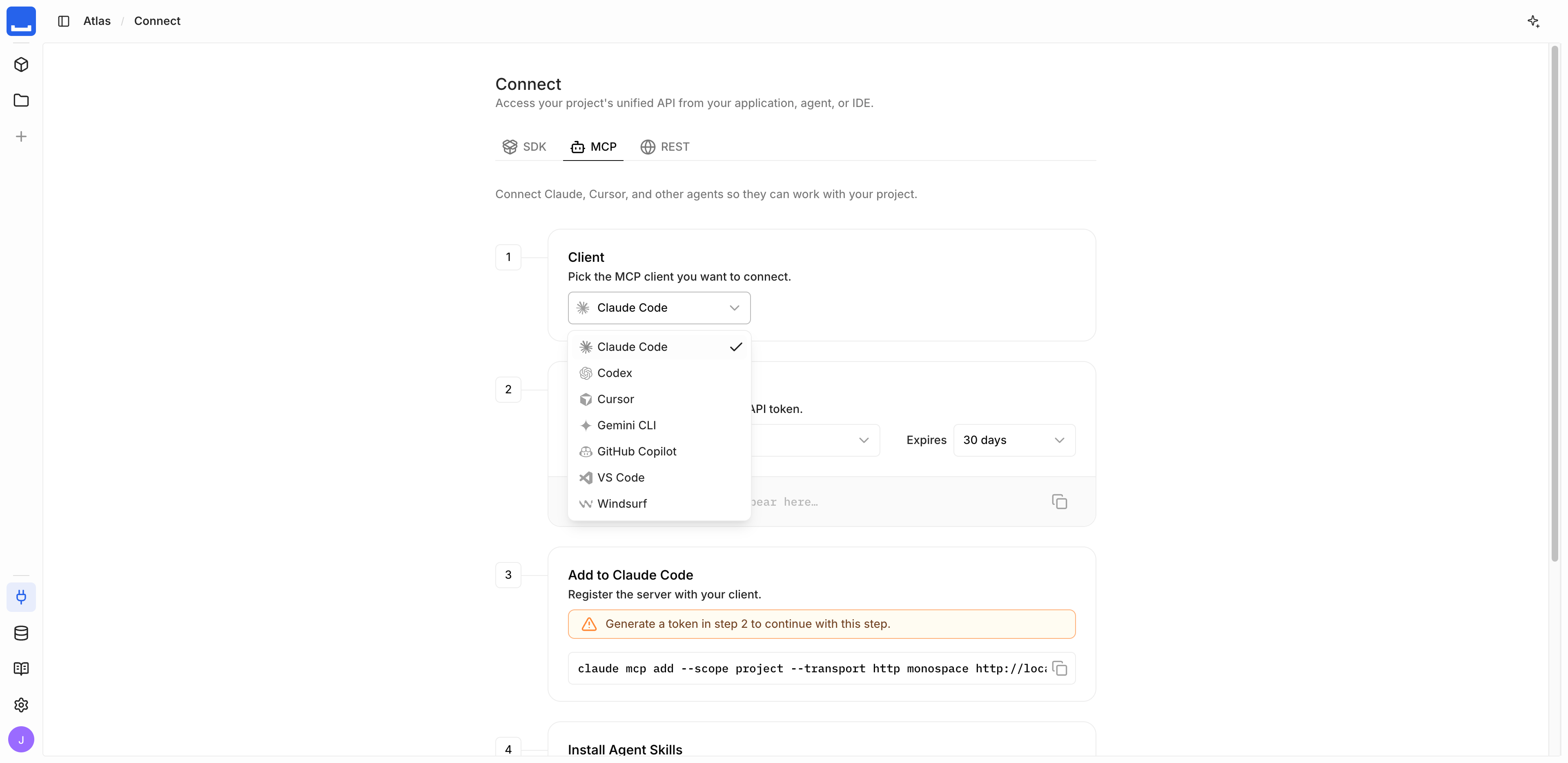
See SDK, MCP, and REST API for client setup.
Shipped byMarc BackesNative JSON Fields
JSON fields used to travel as encoded strings you had to parse and re-stringify yourself. Now they use native JSON end to end: the API returns and accepts raw JSON, and in the Studio new JSON fields default to the native JSON type, edit in a pretty-printed code editor, and display as compact single-line JSON in tables.
{ filter: { metadata: 2 } } is rejected; use { filter: { metadata: { _eq: 2 } } }. Shipped byFlavian DesverneShipped byGuillaume ChauShipped byHannes Küttner
Branded Data Source Presets
The data source picker listed only raw database engines. Now it opens on a branded connector picker: alongside PostgreSQL, MySQL, MariaDB, and SQLite, you can pick managed providers like Neon, Aiven, PlanetScale, and Aurora — each with its own name, logo, and setup notes. The preset is display metadata; the underlying connector still determines how the source connects.
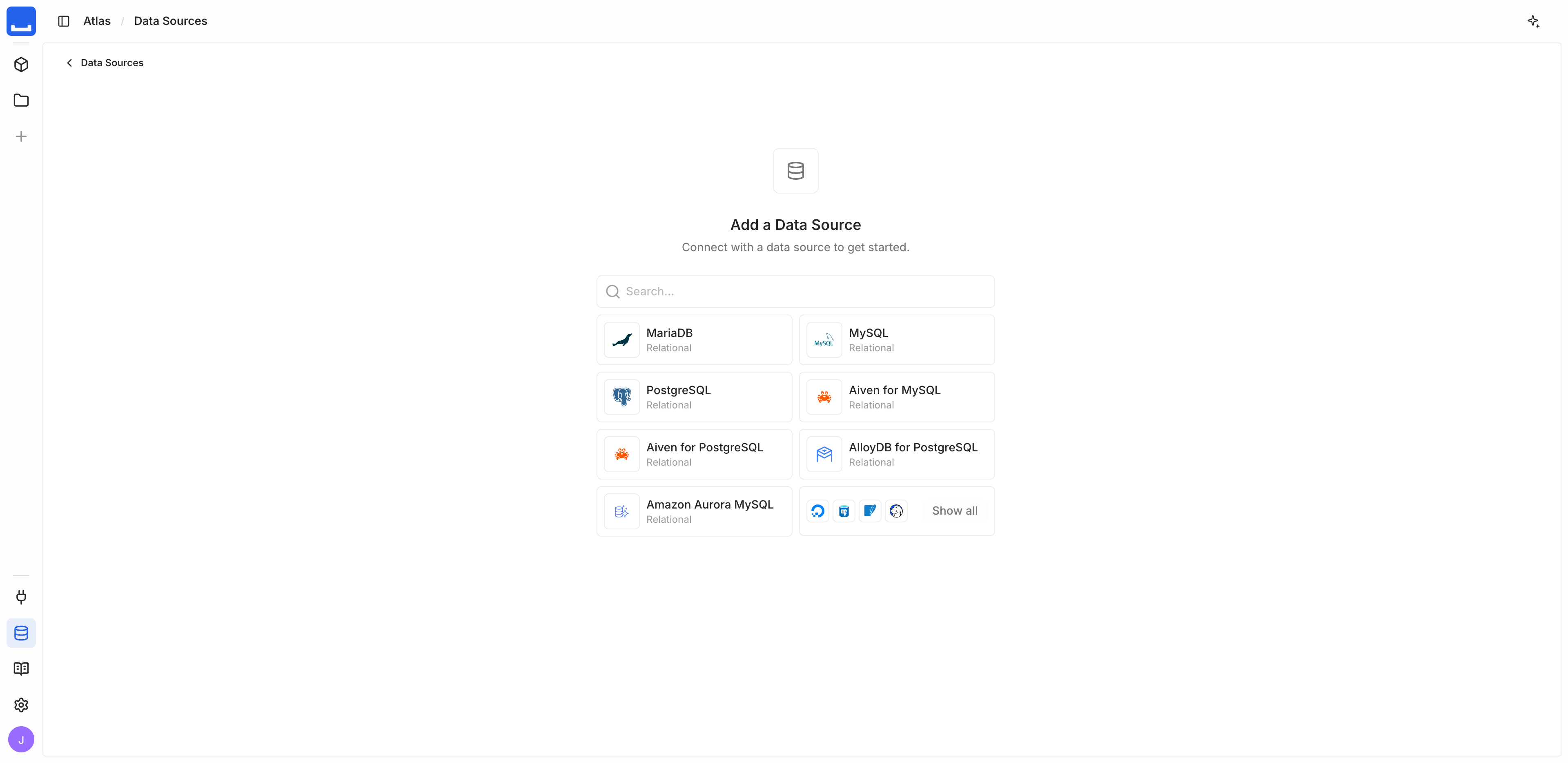
See Connectors for supported databases.
Shipped byHannes KüttnerPermission-Aware Studio
The Studio didn't reflect your permissions — it showed controls and navigation you couldn't actually use. Now it reflects them throughout: controls you can't use are disabled with a tooltip explaining why, role and policy pickers list only the values you may assign, and navigation entries you can't access are hidden. Opening a restricted page by URL redirects you to one you can reach.
Shipped byHannes KüttnerDedicated Project Schemas
User collections used to share the public schema, where separate projects could collide. Now each project uses two dedicated schemas on the system data source: monospace_<project>_meta for system metadata and monospace_<project>_data for the collections you create. When a data source exposes more than one namespace, the Add Collection form also lets you choose which namespace a new collection belongs to.
monospace_<project> is renamed to monospace_<project>_meta, and user collections move from public into monospace_<project>_data. Back up your database before updating.Shipped byFlavian DesverneShipped byMarc BackesConfigurable CORS
Browser apps on another origin couldn't call your API. Now the engine can send CORS headers so they can. CORS is off by default — enable it with MONOSPACE_CORS__ENABLED and set the allowed origins with MONOSPACE_CORS__ORIGIN.
See CORS for the full configuration.
Shipped byHannes KüttnerAccess Tokens in Query Parameters
Passing an access token used to require the Authorization header. Now you can pass it as an access_token query parameter too, alongside the header and the session cookie — for clients that can't set request headers. Sending more than one of these at once is rejected with a 400.
See Authentication for all token sources.
Shipped byRijk van ZantenAnonymous Usage Telemetry
Monospace sends anonymous usage telemetry to guide development. Pings carry a random install ID, the version, a configuration snapshot, and operation counts — never credentials, connection details, or your data. Disable scheduled telemetry with MONOSPACE_TELEMETRY__ENABLED=false. Instance-owner details captured during onboarding sync separately; opt out with MONOSPACE_INSTANCE_OWNER_SYNC_ENABLED=false.
See Telemetry for the opt-out variables.
Shipped byHannes KüttnerShipped byBram Geron- Choose the engine log format with the new
MONOSPACE_LOG_FORMATvariable (compact,full,pretty, orjson); it defaults tojson. - Listing views are shared across users, with each person's filter, search, and layout changes saved automatically and a "Save for everyone" action to publish them.
- The Calendar layout reopens on the date and view you were last using.
- Auto-generated many-to-many junction collections are hidden from content navigation by default.
- Data model collections use list cards, matching the data sources list.
- The organization projects dashboard shows an empty state with a create action when you have no projects.
- The add-source form names the missing fields when a pasted connection string is incomplete.
- Fixed many-to-many relation displays linking to the junction record instead of the related item.
- Fixed deleting the file you're viewing leaving an empty panel instead of redirecting to the asset listing.
- Fixed schema migrations depending on the order their operations are listed in.
- Fixed custom detail pages not loading the item from the URL, so the form opened empty.
- Fixed data table rows with taller content being clamped instead of rendering at full height.
- Fixed CA certificate and mutual TLS settings not reaching the engine for PostgreSQL, MySQL, and MariaDB sources.
Single sign-on, MCP, and the AI assistant
This release adds single sign-on, an MCP server for AI agents, audit logging, MySQL and MariaDB data sources, and an in-Studio AI assistant.
Single Sign-On
Let members sign in with your organization's identity provider instead of a Monospace password. Set up Google, GitHub, Microsoft Entra, Okta, and other OAuth 2.0 providers from Settings → Sign-in Providers — common providers come with presets.
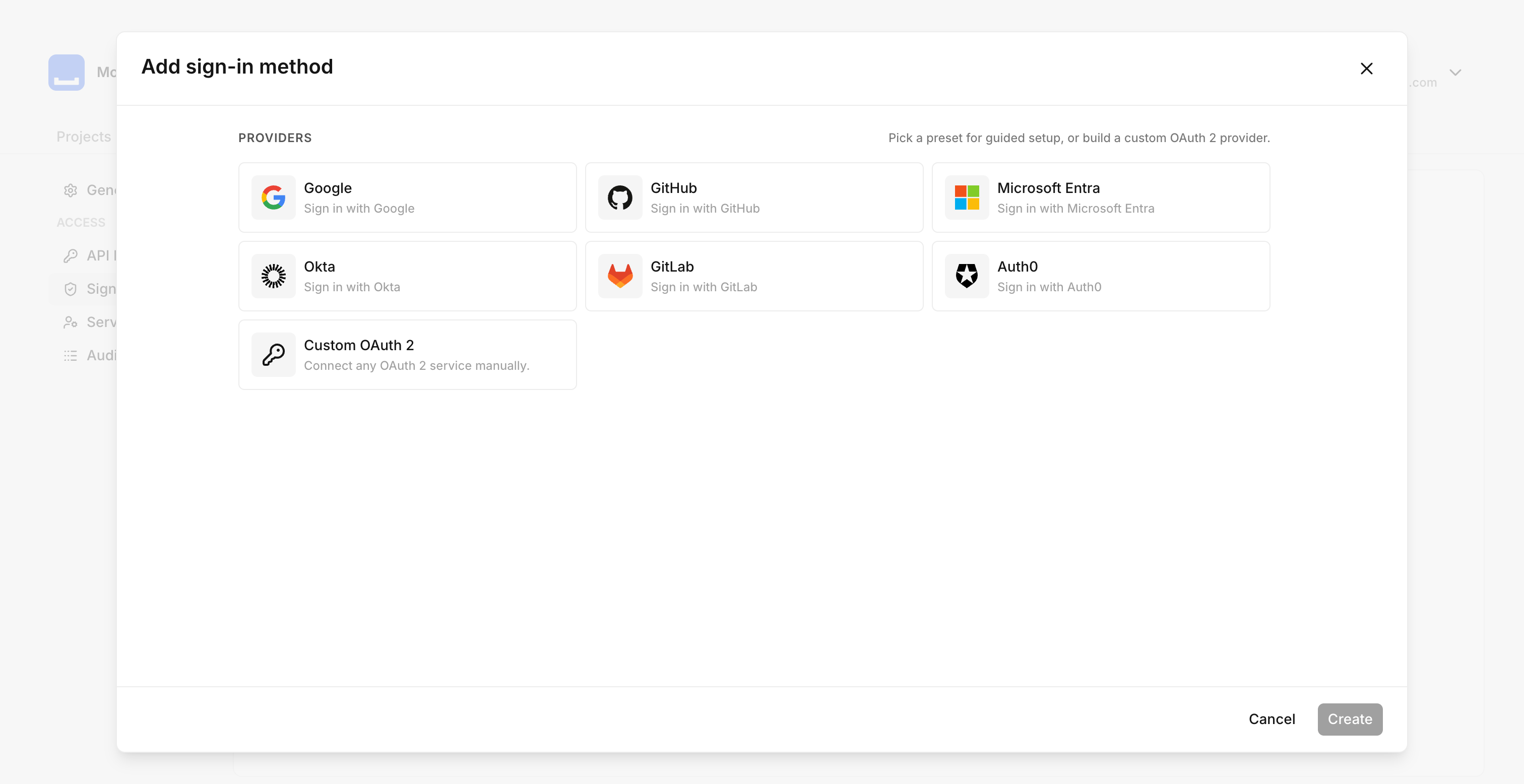
See Configure SSO to connect a provider.
Shipped byReza BaarShipped byFlavian DesverneMCP Server
Connect AI agents to your project through a Model Context Protocol server. Each project exposes its own endpoint at /api/{project}/mcp over streamable HTTP. Agents authenticate with an API key and can query, create, update, and delete items, inspect and modify the schema, and list data sources. Every call runs under the permissions of the key you connect with.
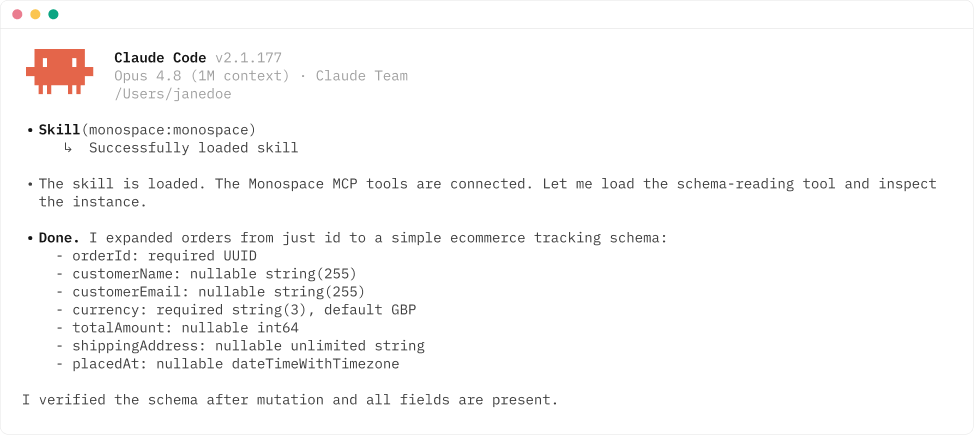
See Configure MCP for setup and client configuration.
Shipped byRijk van ZantenAudit Logs
Monospace now records key activity — user and account changes, invitations, project membership, and schema migrations — to an audit log. Each entry captures who made the change, the outcome, and when it happened. Administrators can read and filter the log through the system API.
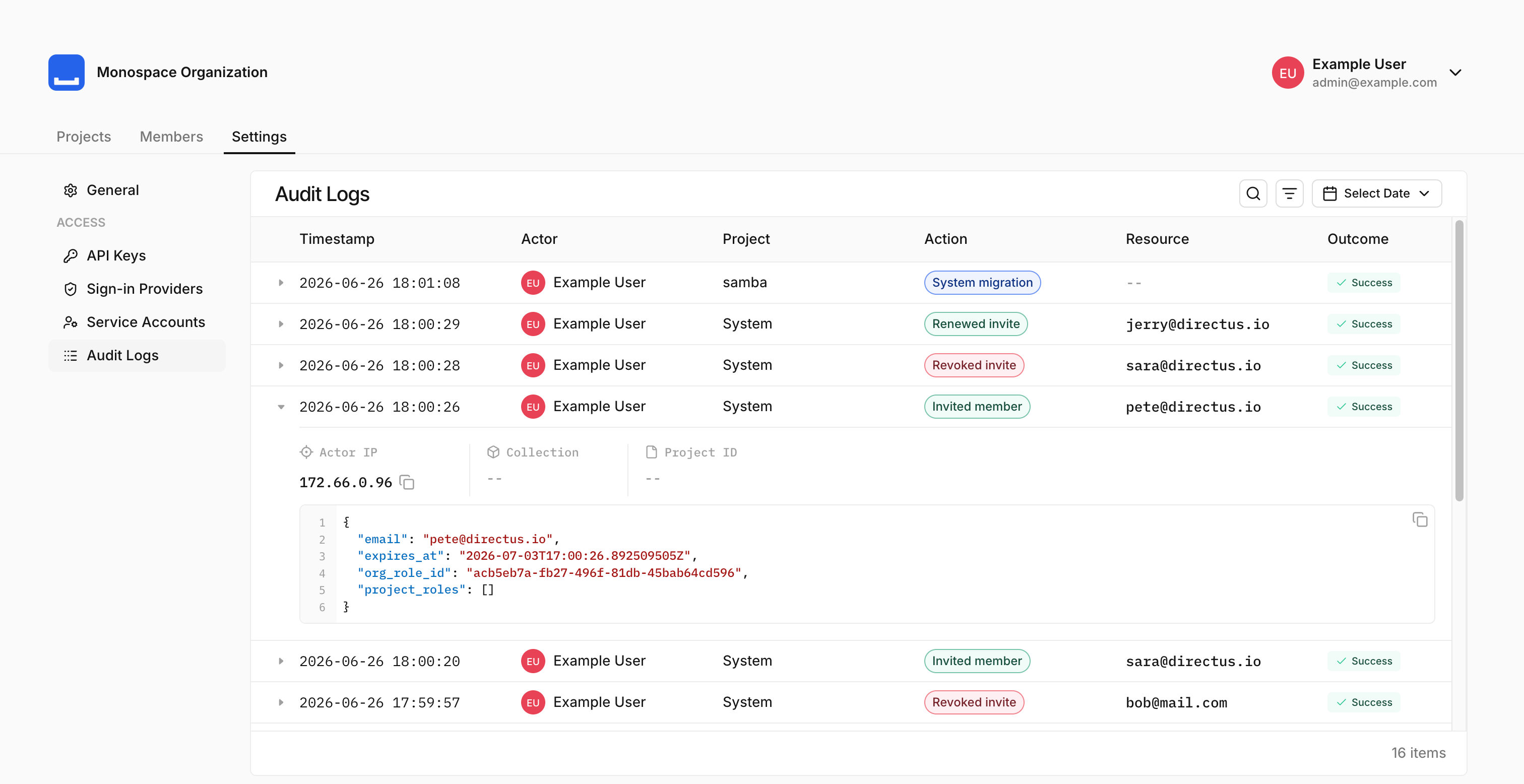
See Audit Logs for the event catalog and how to query them.
Shipped byMarc BackesShipped byFlavian DesverneMySQL & MariaDB
Connect MySQL and MariaDB databases as data sources, alongside PostgreSQL. Add a connection from Data Model → Data Sources using the connection parameters or a connection string, with optional TLS.
See MySQL and MariaDB for connection options.
Shipped byBram GeronAI Assistant
Chat with an AI assistant directly in the Studio. It can query your data, create, update, and delete items, and read or change your schema — all under your own permissions. Configure an AI provider under Settings → AI.
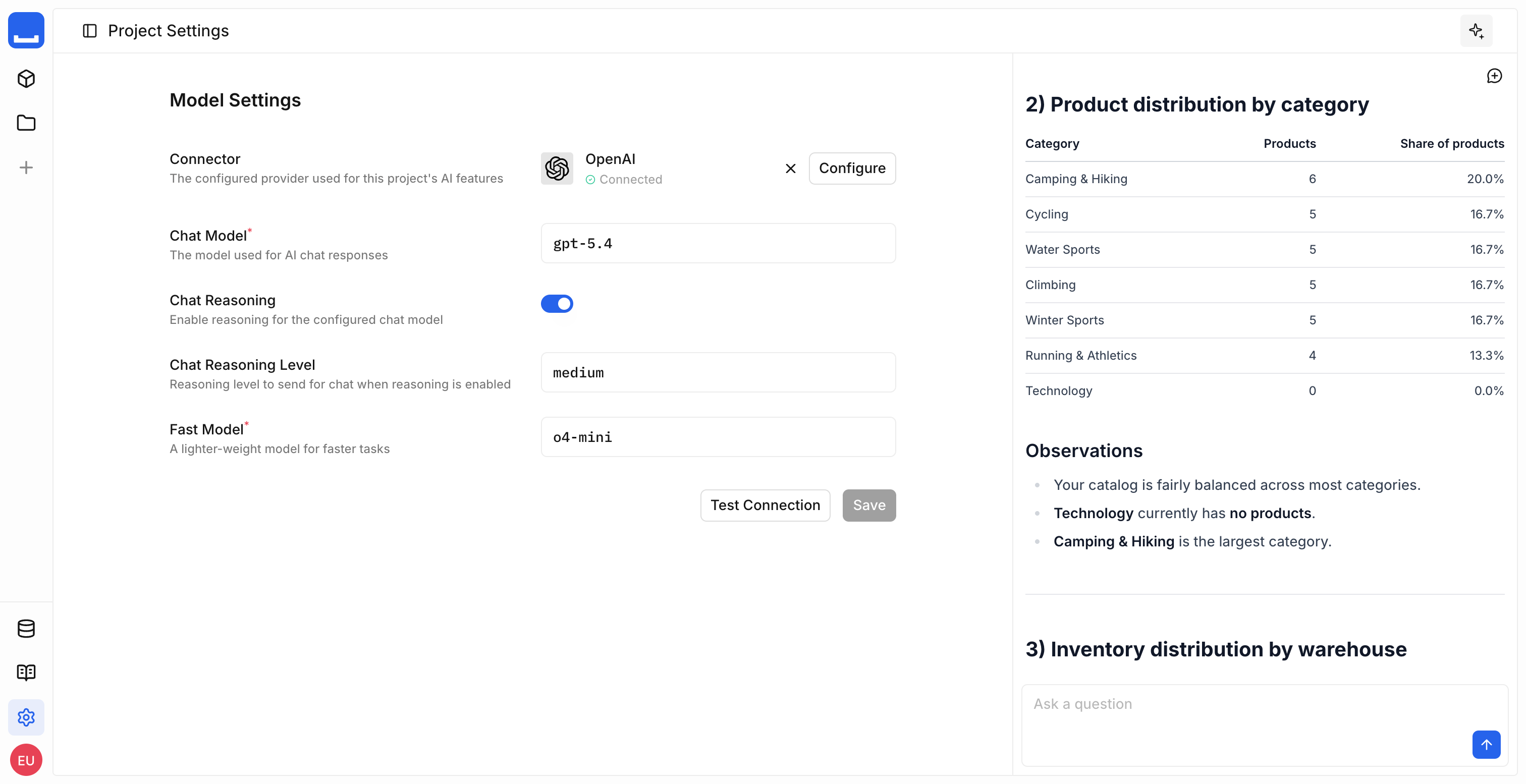
See AI for the assistant and the MCP server.
Shipped byRijk van Zanten- Assign an organization role when inviting a member.
- Set fields to default to the current date or the acting user.
- Filter for empty or non-empty values with the
_nulloperator. - Control where nulls appear in sorted results with
NULLS FIRSTandNULLS LAST. - Pick date ranges with a new date range picker.
- Expand rows in data tables to view more detail.
- Preview images inline with image quick look.
- Data table columns auto-size to their content, up to a maximum width.
- The last-used sign-in method is highlighted on the login screen.
- Refreshed email templates to match the sign-in screen.