Introspection
Database Introspection
When you connect a data source, Monospace reads your database schema and maps it to your Data Model. Tables become collections, columns become fields, and foreign key constraints become relations. You choose which parts of the schema to import.
This walkthrough connects a MySQL database with a user that can only SELECT, browses it in the Studio, and shows a write the database refuses.
Choose What to Add
When you add a data source in the Studio, enter the connection details and select Continue. Monospace scans the source and lists what it found before importing anything. Collections are grouped by namespace — a group of related collections that the data source defines, such as a database schema. Collections outside any namespace are grouped under Collections.
| Step | What you choose |
|---|---|
| Namespace Selection | The namespaces to include. Nothing is selected until you pick one. The Studio skips this step when there is only one group to choose from. |
| Collection Selection | The collections to add. Every collection in a selected namespace starts selected, so you clear the ones to leave out. |
| Review | A summary of the collections to add, confirm to add the source. |
To skip selection and import everything, open the Continue menu and choose Connect Entire Database.
A relation to a collection you leave out is not imported, and its foreign key stays a regular field. If the database schema changes between the scan and your confirmation, the source is not added. Go back to the Connect step and select Continue to scan again.
Monospace stores the namespaces and collections you leave out as the data source's exclusions. You can add a source without selecting any collections and add them later with a schema refresh.
Refresh the Schema
When your database schema changes outside Monospace, refresh the data source to bring the changes in. In Data Model > Data Sources, open the data source's menu and select Refresh Schema. Monospace scans the source and opens Review Changes before it applies anything:
| Section | Contents | Default |
|---|---|---|
| Changes to Your Data Model | Collections already in your data model that the refresh updates or removes | Always applied |
| New Collections | Collections found for the first time | Selected |
| Previously Ignored Collections | Collections you left out when you connected the source or on an earlier refresh | Not selected |
Select Apply Changes to apply the changes and add the selected collections. The collections you leave unselected are stored as exclusions and appear under Previously Ignored Collections on the next refresh.
To run a refresh over the REST API, see Import Changes.
What Gets Discovered
Monospace introspects the following database objects:
- Tables — mapped to collections
- Partitioned tables — mapped to a single collection representing the parent table; child partitions are excluded
- Views and materialized views (PostgreSQL) — mapped to read-only collections
- Columns — mapped to fields, including nullability and default values
- Foreign key constraints — mapped to relations, including referential actions (cascade, set null, etc.)
- Indexes — primary keys, unique indexes, and regular indexes
- Schemas — preserved as namespaces within the data source
Generated columns (GENERATED ALWAYS AS IDENTITY, GENERATED ALWAYS ... STORED) are detected and marked as read-only.
API Names
Every collection and field has an API name — the identifier you use in queries. A valid API name starts with a letter and contains only letters, digits, and underscores.
Introspection derives one from each source name: unicode is transliterated to ASCII, your workspace's naming convention is applied, and a leading digit is prefixed with n.
| Source name | API name (camelCase convention) |
|---|---|
café table | cafeTable |
straße | strasse |
2024 sales | n2024Sales |
The naming convention applies to introspection only. An API name you supply yourself — through the Studio or POST /api/{workspace}/schema/migrate — is validated but never rewritten to match the convention. An invalid one is rejected with a 422.
Existing API names are never renamed. The rule applies to names you create or edit.
What Is Not Introspected
The following database objects are not discovered during introspection:
- Check constraints
- Stored procedures, functions, and triggers
- Row-level security (RLS) policies
- Table and column comments
- Expression-based indexes
- Partial (conditional) indexes
- Exclusion constraints
Unsupported Column Types
Columns with types that Monospace does not support are still visible in the Data Model, but are excluded from the API — they cannot be queried, filtered, or written to.
The following PostgreSQL types are currently unsupported:
- Enum types
- Range types (
int4range,tsrange, etc.) - Composite / custom types
- Multi-dimensional arrays
money,interval- Geometric types (
point,line,box,polygon,circle, etc.) - Full-text search types (
tsvector,tsquery) xml- Network types (
macaddr,macaddr8)
Known Limitations
Referenced Field Uniqueness
Monospace supports foreign keys whose referenced field set has a primary key or unique index. The unique index can cover one field or a composite field set.
Foreign keys that reference non-unique field sets are not supported. Some MySQL and MariaDB configurations accept these non-standard constraints, but Monospace cannot represent their relation cardinality correctly.
Composite Foreign Keys
Composite foreign keys (constraints spanning multiple columns) are fully supported.
Self-Referencing Relations
Tables with foreign keys referencing themselves are fully supported.
Data Source Access
You can lock a data source's schema to keep Monospace from changing its database structure. A locked schema refuses migrations that create, delete, or alter collections, fields, or indexes in the source, and relations that add a foreign key to one of its collections. The engine enforces the lock for every user, including workspace administrators.
On a locked source, you can still:
- Change API names, display names, and other appearance settings.
- Create a relation whose foreign key is in a collection outside the locked source, such as a to-one relation from another source into a locked collection.
- Refresh the schema to bring in changes made in the database.
- Read, create, update, and delete items.
Lock the Schema
To lock a new source, turn on Lock Schema when you enter its connection details.
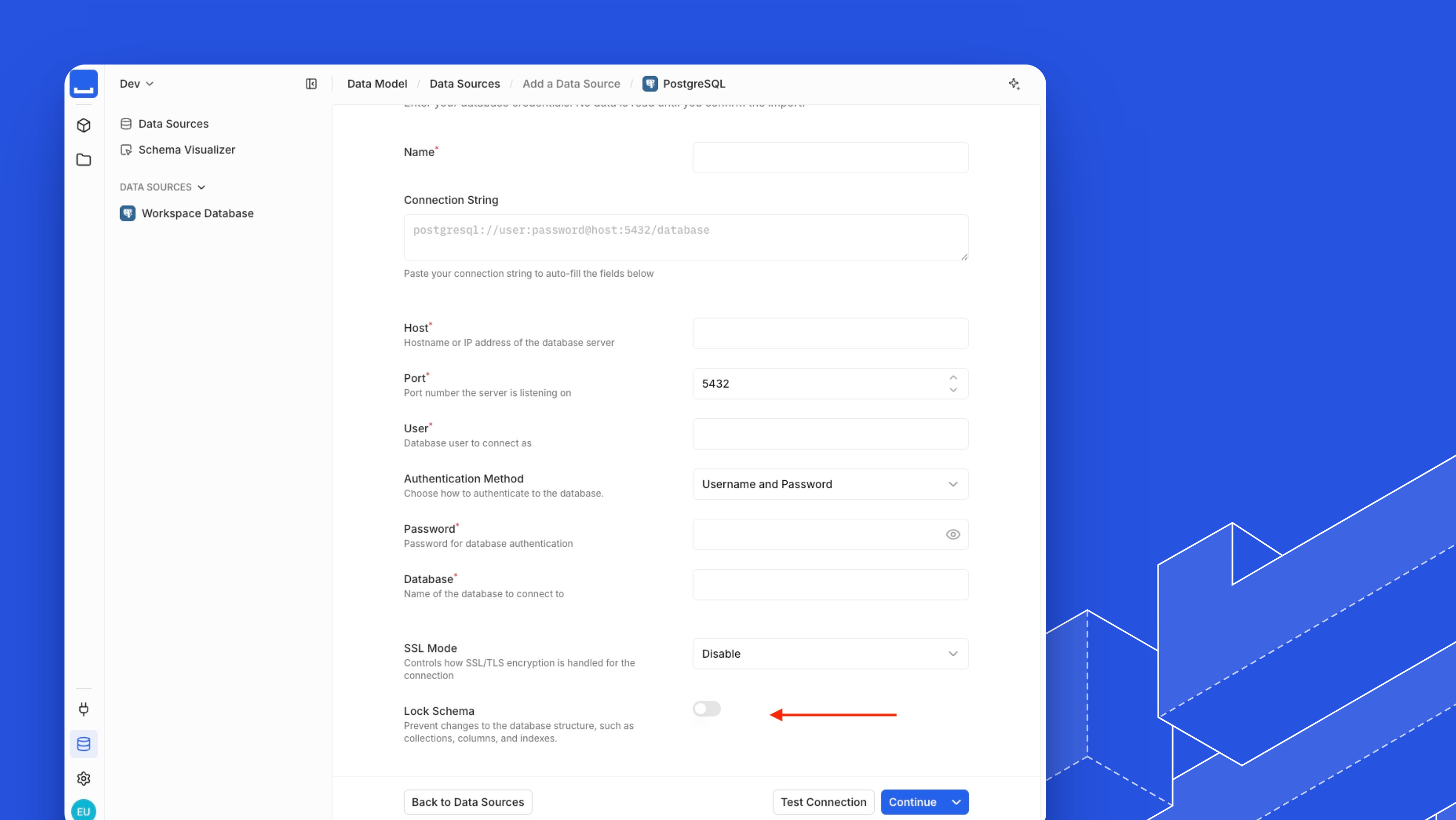
To lock or unlock an existing source, go to Data Model > Data Sources, open the source's menu, and select Settings. Monospace asks you to confirm the change.
The Studio marks a locked source with a Schema Locked badge in the source list and a notice on its source and collection pages. It hides schema actions for the source and disables relation types that would add a foreign key to a locked collection.